

alstom AMS42/84 5B Amplifier SystemAmplifier Technology at its Best.
AMS42/84
5B Amplifier System
Amplifier Technology at its Best.
Compact or 19 Inch.
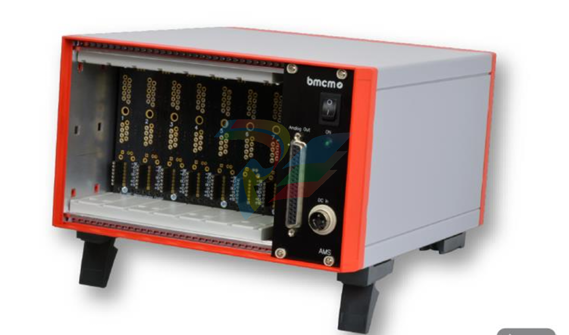
Get your amplifier technology wrapped up with
the AMS42/84. Available in a robust aluminum
housing as a mobile tabletop unit (AMS42) with
skid-proof, tip-up feet for 8 channels or as a
16-channel stationary version (AMS84) for 19''
rack systems.
Modular Concept.
Equip Individually. Be Flexible.
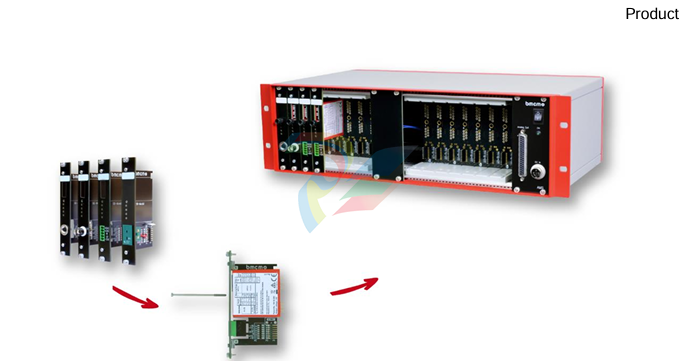
The AMS device is equipped with cassettes, on
which the required 5B measuring amplifiers are
mounted. The variety of available 5B modules
allows for the optimum adaptation of the
AMS42/84 to any special measuring task.
Choose Connector.
Mount 5B Amplifier. Done.
The available plug-in cassettes have different
connectors on the front panel. Depending on
the sensor or signal to be connected, the
suitable cassette can be chosen. The 5B
module only has to be fixed on the cassette
now and be integrated in the AMS system.
Clearly Safe.
Most of the 5B modules feature galvanic
isolation between the channels and from the
data acquisition and control system. This
perfectly protects the whole system against
high potentials and interferences.
Well Supplied.
The AMS42/84 is operated with 9-40V via an
external power supply.
Connection to the DAQ System.
The amplifier outputs are available at a D
Sub37 female connector. They are connected
to the input lines of a data acquisition system.
Combining the AMS42/84 with a measuring
card or DAQ system from bmcm makes a
powerful measurement system.
Accessories. Just Makes it Easier.
To individually equip the AMS devices, various
5B modules and plug-in cassettes as well as
other accessories (e.g. external power supply,
carrying handle, connection cable) are
provided.
Versions and Options.
Something for Everybody.
AMS42/84 versions with an integrated DAQ
system (USB, LAN) are also available. With the
8-channel extension AMS-EXT8. the number of
channels can optionally be increased to 16 in
the AMS42.
1 Installation
1.1 Assembly
a) Equip the AMS42/84 with the plug-in cassettes (see chapter 4.2) carrying the required 5B
modules.
b) Carefully push the cassette along the guide bars of the relevant slot until the 7-way pin
connector of the cassette and the pins of the 5B module are plugged into the corresponding
connectors on the AMS backplane.
c) If using the AMS42 with the option AMS-EXT8 (see chapter 4.4), the additional cassettes are
mounted on the back of the device.
d) For a tight installation, fix the front panel at both ends with screws to the housing. Bridge
unneeded slots by a blank panel (AMS-K-BLANK) to protect the device against outside
influences.
e) If the AMS84 is mounted to a 19'' rack system, the relevant input wiring should be prepared first
before attaching the device to the rack system with screws.
1.2 Software Installation and Start-up Procedure
a) Connect your PC data acquisition system to the 37-pin D-Sub female.
b) Attach an external power unit to the 3-pin DIN coupling for 9-40V power supply (use a supply
cable with a cross sectional area >1mm2) and turn on the AMS42/84 by pressing the switch to
"1" (ON) (see chapter 2.1 and 2.2).
c) Signals are attached at the specific connector of the respective AMS cassette panel.
• To change the cassettes, the power of the AMS device must be turned off!
• If the AMS system is operated standalone, additional grounding to enhance shielding is
recommended but not mandatory.
2 Connections / Assignments
All available connectors and operating elements of the
AMS42/84 are accessible on the right-hand side of the
device front.
2.1 Switch and LED
The AMS42/84 is turned on (press "1") and off (press "0")
with the switch.
The green LED "ON" indicates the operation of the device.
2.2 Power Supply "DC In"
The AMS device is supplied with power (9..40V) via the 3
pin DIN plug. A power supply unit ZU-PW40W (24V, 1.67A
DC) is optionally available.
2.3 Analog Channels
8 (AMS42) or 16 (AMS84) analog signals can be connected to the
amplifier inputs available at the respective connectors of the cassette
panels.
Their assignment is illustrated in the data sheet of the AMS-K cassettes.
To connect a PC data acquisition system, these analog outputs are led
out to the 37-pin D-Sub female.
Depending on the application, the shield of the analog input cables can be applied to ground or 0V. Be
sure to connect at one end of the cable only. Run the signal ground separately if possible. Lay input
cable separately if possible.
• The housing of the D-Sub37 female is connected to the AMS housing (and ground eventually).
• If the device features 16 channels (AMS84. AMS42 + AMS-EXT8), the ground of the first eight
channels is not electrically connected to the ground of the next eight channels.
3 AMS Backplane
The AMS-backplane provides 8 slots for 5B modules and the AMS-K plug-in cassettes (see chapter
4.2) carrying the 5B modules. Two backplanes are integrated in the AMS84.
If the optional add-on AMS-EXT8 (see chapter 4.4) is used, eight slots each are available on the front
and on the back of the AMS42.
3.1 Ground-to-Ground Resistance
Ideally, the output ground is not electrically connected with the power supply ground. If, however, a
connection to ground is necessary (e.g. to use the output switch in the 5B module), the 2-pin jumper
(see fig. above) must be closed.
In the case of electrically connected systems (e.g. PC), this jumper represents a high-resistance
bridge (1k ) and may generate a hum loop!
3.2 Module Pin Assignment
The pin assignment on the right shows the top view of the module
backplane (see chapter 3).
The pin assignment corresponds to the 5B modules of Analog
Devices®, BURR BROWN® etc. However, an additional 0EX pin has
been introduced, which is particularly suitable for ungrounded
shielding. This is a specific assignment of BMC Messsysteme
GmbH. The 0EX pin is not connected in modules of other
manufacturers.
3.3 Fuse
The fusing of the AMS backplane is effected on the backplane (see chapter 3) with one reversible
semi-conductor fuse. In case of overload, it turns off. To make the fuse work effectively again, first
remove the cause for overload before disconnecting the power supply of the AMS42/84.
3.4 Connection for AMS Cassettes
The cassettes are connected to the AMS backplane via 7-way pin connectors,
leading the input signals connected at the cassette panel to the backplane. The
assignment of the 7-way female connector on the board is illustrated in the figure on
the right-hand side.
4 Supplementary Products for AMS42/84
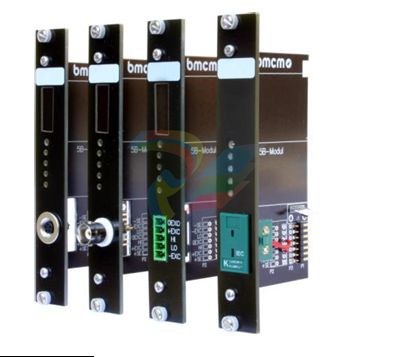
4.1 5B Modules (MA Line)
The 5B measuring amplifiers from bmcm allow for the professional
signal adjustment to a data acquisition system.
The amplifier output is 5V or 0..5V. Most of the modules are
electrically isolating and provide sensor supply.
The following 5B modules from bmcm are available:
4.2 Plug-in Cassettes (AMS-K Line)
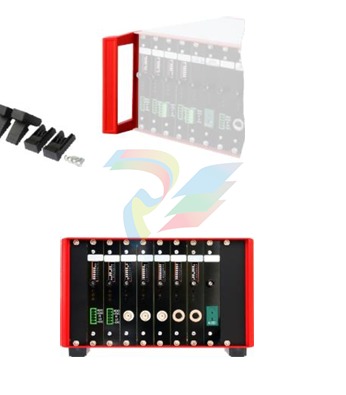
The amplifier system can be individually equipped with 8
(AMS42-USB) or 16 (AMS84) plug-in cassettes.
Each cassette is equipped with the relevant 5B module and
suitable input connector.
The suitable input connector on the front panel guarantees for
the relevant connection to be available when exchanging the
cassette.
The following cassettes are available:
Product
Description
AMS-K-BIN5
cassette with panel and 5-pin Binder female connector (712 series)
AMS-K-BLANK blank panel
AMS-K-BNC
AMS-K-CO5
cassette with front panel and BNC female connector
cassette with front panel and 5-pin terminal connector
AMS-K-THK
cassette with front panel and thermocouple socket (type K)
4.3 AMS-HANDLE2. AMS-FOOT
For mobile use, the AMS42/84 can be equipped with two stable
metal handles at the housing frame (AMS-HANDLE2).
If the AMS84 is not installed in a 19'' rack, a set of tip-up feet
(AMS-FOOT) can optionally be ordered.
4.4 AMS-EXT8
With the add-on option AMS-EXT8. 8 additional analog channels are
available at the back of the AMS42. In this case the device features max. 16
channels.
The analog outputs are accessible at a second D-Sub37 female with the
same assignment as the standard D-Sub37 female of the AMS device (see
chapter 2.3).
5 Important Notes for Using the AMS42/84
AMS42/84
• The device is only suitable for extra-low voltages - please observe the relevant regulations! For reasons
relating to EMC, it must only be used in closed PC housings.
• Only use an electrical isolated power supply unit (with CE).
• Only use non-solvent detergents for cleaning. The product is designed to be maintenance-free.
• For calibration purposes, the device must be returned to BMC Messsysteme GmbH.
• Use shielded cables for reasons relating to CE. Connect the shield to ground at one end only. Close open
inputs if possible.
• When mounting the cassettes, a connection between power supply ground and chassis of the device is made
via the module screw.
• The device must not be used for safety-relevant tasks. With the use of the product, the customer becomes
manufacturer by law and is therefore fully responsible for the proper installation and use of the product. In the
case of improper use and/or unauthorized interference, our warranty ceases and any warranty claim is
excluded.
-
Eaton SPSC5N4MEAXX2A Power Defense SB
-
Eaton MPN8403VEAXX2H Magnum low voltage power circuit breaker
-
NZMB2-4-A200 MCCB NZM, NZM2 TM and Elec
-
Eaton NZMN1-A63 Series NZM complete molded case circuit breaker
-
Eaton NZMB1-S26-CNA Series NZM complete molded case circuit breaker
-
Eaton NZMH2-A25-NA Series NZM complete molded case circuit breaker
-
NZMH2-A200-BT-NA Eaton Series NZM complete molded case circuit breaker
-
NZMN4-VEF1200-NA Eaton Series NZM complete molded case circuit breaker
-
NZMH2-AF250-NA MCCB NZM, NZM2 TM and Elec
-
NZMB1-AF60-NA Eaton Series NZM complete molded case circuit breaker
-
NZMN1-A50 Eaton Series NZM complete molded case circuit breaker
-
NZMH2-A80-NA Eaton Series NZM complete molded case circuit breaker
-
Eaton Cutler-Hammer HFD3030 6639C86G87 3 Pole 30A 600V Circuit Breaker
-
Moeller XV-230-57CNN-1-13-1 HMI PLC Panel Touchscreen 5.7"
-
EATON CEAG CU CG-S , 40071360300 Control Unit
-
EATON SDN90186 MOTOR CONTROL CENTER
-
EATON HMCP150U4 CIRCUIT BREAKER
-
Eaton 7801C57 Digitrip Optimizer Hand Held Programmer
-
Eaton HMCP400R5 Circuit Breaker
-
EATON MP-3000 SAFETY RELAY 66D2032GX1
-
EATON PGGLOBL1701DPRO 1785T Touch Panel
-
Eaton, Moeller, Easy MFD-CP8-NT
-
Eaton WL-35717F Vacuum Interrupter
-
EATON VICKERS EEA-PAM-535-A-32 AMPLIFIER CARD
-
EATON FP5000-00 / FP5200-00 66D2041G11 FEEDER PROTECTION RELAY
-
Eaton IQ-504 120VAC Modular Overload Relay
-
Beckhoff CX5620-0225 CPU module
-
Beckhoff CX5620-0220 CPU module
-
Beckhoff CX5620-0215 CPU module, Beckhoff RT Linux®
-
Beckhoff CX5620-0210 CPU module, Beckhoff RT Linux®
-
Beckhoff CX5620-0195 CPU module
-
Beckhoff CX5620-0190 CPU module
-
Beckhoff CX5620-0185 CPU module
-
Beckhoff CX5620-0175 CPU module
-
Beckhoff CX5620-0170 CPU module
-
Beckhoff CX5620-0163 CPU module
-
Beckhoff CX5620-0162 CPU module
-
Beckhoff CX5620-0161 CPU module
-
Beckhoff CX5620-0160 CPU module
-
Beckhoff CX5620-0100 CPU module
-
Beckhoff CX5120-0195 CPU module
-
Beckhoff CX5120-0190 CPU module
-
Beckhoff CX5120-0185 CPU module
-
Beckhoff CX5120-0175 CPU module
-
Beckhoff CX5120-0170 CPU module
-
Beckhoff CX5120-0163 CPU module
-
Beckhoff CX5120-0162 CPU module,
-
Beckhoff CX5120-0161 CPU module
-
Beckhoff CX5120-0160 CPU module,
-
Beckhoff CX5120-0150 CPU module
-
Beckhoff CX5120-0143 CPU module
-
Beckhoff CX5120-0142 CPU module
-
Beckhoff CX5120-0141 CPU module, Microsoft Windows 10 IoT Enterprise 2016 LTSB
-
Beckhoff CX5120-0140 CPU module
-
Beckhoff CX5120-0130 CPU module
-
Beckhoff CX5120-0123 CPU module
-
Beckhoff CX5120-0122 CPU module
-
Beckhoff CX5120-0120 CPU module
-
Beckhoff CX5120-0113 CPU module
-
Beckhoff CX5120-0112 CPU module
-
Beckhoff CX5120-0111 CPU module
-
Beckhoff CX5120-0110 CPU module
-
Beckhoff CX5120-0100 CPU module, no operating system
-
Beckhoff C6017-0040 | Fanless ultra-compact Industrial PC
-
Beckhoff C6017 | Fanless ultra-compact Industrial PC
-
Beckhoff C6015-0030 | Fanless ultra-compact Industrial PC
-
Beckhoff C6015-0040 | Fanless ultra-compact Industrial PC
-
Beckhoff C6015 | Fanless ultra-compact Industrial PC
-
Beckhoff CX2500-M510 | Fieldbus master module
-
Beckhoff CX2500-M310 | Fieldbus master module
-
Beckhoff CX2500-B510 | Fieldbus slave module
-
Beckhoff CX2500-B310 | Fieldbus slave module PROFIBUS for CX20xx, CX52x0. CX53x0. CX56x0
-
Beckhoff CX2500-0070 | USB 3.0 module for CX20xx, CX52xx, CX53x0. CX56x0
-
Beckhoff CX2500-0062 | 2.5 Gbit Ethernet module for CX20xx, CX52x0. CX53x0. CX56x0
-
Beckhoff CX2500-1061 | Power over Ethernet module for CX20xx, CX52x0. CX53x0. CX56x0
-
Beckhoff CX2500-1060 | Ethernet module for CX20xx, CX52x0. CX53x0. CX56x0
-
Beckhoff CX2500-0031 | Serial Interface RS485/RS422
-
Beckhoff CX2500-0030 | Serial Interface RS232 for CX20xx, CX52x0. CX53x0. CX56x0
-
Beckhoff CX5230-0195 CPU module
-
Beckhoff CX5230-0190 CPU module
-
Beckhoff CX5230-0175 CPU module,
-
Beckhoff CX5230-0170 CPU module
-
Beckhoff CX5230-0100 CPU module, no operating system, no TwinCAT
-
Beckhoff CU8130-0240 | UPS modul, battery-backed
-
Beckhoff CU8130-0120 | UPS module, battery-backed
-
Beckhoff CU8110-0120 | UPS module, capacitive
-
Beckhoff CU8110-0060 | UPS module, capacitive
-
Beckhoff CX5130-0195 CPU module
-
Beckhoff CX5130-0190 CPU module
-
Beckhoff CX5130-0185 CPU module
-
Beckhoff CX5130-0170 CPU module
-
Beckhoff CX5130-0163 CPU module, Microsoft Windows 10 IoT Enterprise 2019 LTSC, 32 bit
-
Beckhoff CX5130-0162 CPU module
-
Beckhoff CX5130-0161 CPU module
-
Beckhoff CX5130-0160 CPU module
-
Beckhoff CX5130-0155 CPU module
-
Beckhoff CX5130-0150 CPU module
-
Beckhoff CX5130-0143 CPU module
-
Beckhoff CX5130-0142 CPU module
-
Beckhoff CX5130-0140 CPU module
-
Beckhoff CX5130-0135 CPU module
-
Beckhoff CX5130-0130 CPU module
-
Beckhoff CX5130-0125 CPU module
-
Beckhoff CX5130-0123 CPU module
-
Beckhoff CX5130-0122 CPU module
-
Beckhoff CX5130-0121 CPU module
-
Beckhoff CX5130-0115 CPU module,
-
Beckhoff CX5130-0113 CPU module
-
Beckhoff CX5130-0112 CPU module
-
Beckhoff CX5130-0111 CPU module
-
Beckhoff CX5130-0110 CPU module, Microsoft Windows Embedded Compact 7. no TwinCAT
-
Beckhoff CX5130-0100 CPU module, no operating system, no TwinCAT
-
DEIF FAS-113DG Synchronisation & circuit breaker closing
-
DEIF FAS-115DG Synchronisation & circuit breaker closing
-
DEIF HAS-111DG Synchronisation & circuit breaker closing
-
DEIF LSU-122DG Load sharing, paralleling & operation
-
DEIF LSU-114DG Load sharing, paralleling & operation
-
DEIF LSU-113DG Load sharing, paralleling & operation
-
DEIF LSU-112DG Load sharing, paralleling & operation
-
DEIF RMF-112D Frequency relay
-
DEIF RMC-142D Current relay
-
DEIF RMC-132D Current relay
-
DEIF RMC-131D Current relay
-
DEIF RMC-122D Current relay
-
DEIF RMC-121D Current relay
-
DEIF RMC-111D Current relay
-
DEIF MVR-V211 Busbar Protection
-
DEIF MVR-T257 Transformer Differential Protection

Add: High-tech Software Park, Xiamen City, Fujian Province
Mobile: +86-17750019513(WhatsApp)
Email: yy4291644@gmail.com
Website: https://www.abb-sis.com
.jpg)
.jpg)
.jpg)
.jpg)
.jpg)
.jpg)

-
Eaton SPSC5N4MEAXX2A Power Defense SB
-
Eaton MPN8403VEAXX2H Magnum low voltage power circuit breaker
-
NZMB2-4-A200 MCCB NZM, NZM2 TM and Elec
-
Eaton NZMN1-A63 Series NZM complete molded case circuit breaker
-
Eaton NZMB1-S26-CNA Series NZM complete molded case circuit breaker
