

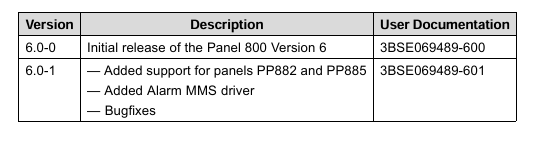
ABB Panel 800 Version 6- Panel Builder Version 6.0-1
The Panel Builder software is used to configure operator panels PP871, PP874,
PP877, PP882 and PP885 from ABB.
Panel Builder contains all basic functions needed in an application. The functions
are tested and developed with customer needs and preferences in focus.
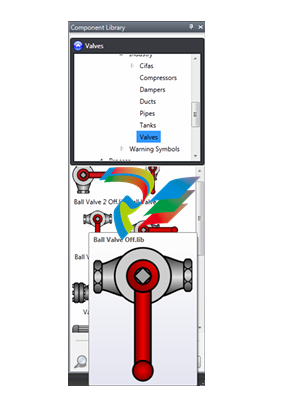
Pre-defined objects in Panel Builder can be used to create complete process images,
providing an overview of a complex application. You can customize the pre-defined
objects or create objects of your own.
Communication drivers for a large number of controllers and automation equipment
are available.
The help file assumes that the most recent versions of the system program (image)
and Panel Builder are used
The Panel Builder software is supplied on a DVD. Double click on the file setup.exe
found on the DVD, and follow the instructions to install Panel Builder.
The installation creates an icon for Panel Builder in the group named Panel Builder.
Click on Start/All Programs/Panel Builder 800 Version 6/Panel Builder 800
Version 6 to start Panel Builder.
The top folder for a specific application designed with Panel Builder is referred
to as the project folder.
During runtime, project database files can be updated, for example with new recipes.
This means that to completely reproduce a project that has been in operation, it may
be necessary to combine source files with files retrieved from the operator panel.
File Structure
Aproject contains a set of files related to the functional and graphical design and
asetoffiles related to the runtime operation of the project, where the latter is
compiled from the design files.
Project Folder
When a new project is created, a folder with the project name is created as the
top-level container, the Project folder. The files that define the functional and
graphical design reside in the top level of the project folder. Other folders are created
as a result of validation and build
Symbols
Pictures that are used in projects are converted to .png files when the project is
validated.
Pictures are resized to the largest static usage in any of the project screens, in order to
save memory space in the panel. If a picture is enlarged in runtime using dynamics,
the enlarged picture will have a lower effective resolution.
Project pictures are stored in the Symbols folder as a compressed folder named
Symbols.zip.
Temp
The Temp folder contains intermediate build files from project compilation.
The Temp folder also includes the Output folder. The Output folder contains all
iles needed to run the project in the target. These files are copied to an operator
panel when the Transfer command is used. For a PC, the Transfer to folder
command is used to copy the necessary files to a USB stick to the runtime PC via
anetworkconnection.
Moving Design Files
To move theprojectfiles needed for the design:
Create a new folder for the project design files.
Copy all single files (files not included in any folders) as well as all folders,
except the Temp folder, in the project folder.
Paste the files in the new folder.
Moving Application Project
The runtime project can be downloaded to the operator panel using the transfer or
export commands, but can also be moved manually:
Create the new folder for the project files.
Copy the Output folder.
Paste it in the new folder
Database
The database used for Panel Builder projects is of SQL Server Compact Edition type.
The contents of the database can be managed with third-party database management
tools. Panel Builder includes a database viewer object that can be used to display
database contents in runtime.
The database is initially transferred to the operator panel using the transfer command.
The database will only be updated if there are changes made in the project that
affects the database contents, for example:
• Changed or added recipes
• Changed or added data loggers
mhandling
• Changed or added trend viewers
Acopy of the database can be made with the Upload Database command. Some of
the databases can be exported individually in csv, comma separated values, format
using the Database Export action. If possible, it is recommended to use the database
export action rather than the backup database a
-
AEROTECH Automation1 SI4 Stepper Interface
-
AEROTECH Automation1 XI4 Servo Interface
-
AEROTECH AEROTECH Automation1 iXI4 Servo Interface with Motion Controller
-
AEROTECH Automation1 XC6e Enhanced, High-Power PWM Servo Drive
-
AEROTECH Automation1 iXC6e Enhanced, High-Power PWM Servo Drive with Motion Controller
-
AEROTECH Automation1 XC2 Compact PWM Servo Drive
-
AEROTECH Automation1 XC4 PWM Servo Drive
-
AEROTECH Automation1 GL4 Galvo Laser Scan Head Linear Drive
-
AEROTECH Automation1 XC2e Enhanced, Compact Servo Drive with PWM+
-
AEROTECH Automation1 XC4e Enhanced, PWM Servo Drive
-
AEROTECH Automation1 XR3 Multi-Axis Servo Drive Rack
-
AEROTECH Automation1 iXR3 Multi-Axis Servo Drive Rack with Motion Controller
-
AEROTECH Automation1 iXC2 Compact PWM Servo Drive with Motion Controller
-
AEROTECH Automation1 iXC2e Enhanced, Compact PWM+ Servo Drive with Motion Controller
-
AEROTECH Automation1 iXC4 PWM Servo Drive with Motion Controller
-
AEROTECH Automation1 iXC4e Enhanced, PWM Servo Drive with Motion Controller
-
AEROTECH Automation1 iPC Industrial PC with Motion Controller
-
AEROTECH EPICS & TANGO Drivers for Distributed Control Systems
-
AEROTECH .NET, C, Python & LabVIEW APIs Custom Application Develotpmen
-
AEROTECH Automation1 Industrial Ethernet Support
-
AEROTECH Automation1 iSMC Intelligent, Software-Based Motion Controller
-
AEROTECH Automation1 iXA4 1- 2- or 4-Axis PWM Servo Drive with Motion Controller
-
AEROTECH Automation1 XA4 1- 2- or 4-Axis PWM Servo Drive
-
CTI 2500-ADP2-DISC Discrete Wiring Adapter for Series 500
-
CTI 2500-ADP1 Analog Wiring Adapter for Series 500
-
CTI 2500C-RADP-RS485 Remote Base Controller Adapter for Series 500
-
CTI 2500C-RADP-RBC Profibus RBC Adapter for Series 500
-
CTI 2500C-PADP-120V 120VAC 50W Power Supply for Series 500
-
CTI 2500-RADP RBC Adapter for Series 500
-
CTI 2500-R4500 520/530/DBC Adapter for Series 500 - MATURE
-
CTI 2500-PADP Power Supply Adapter for Series 500
-
CTI 2500-IADP I/O Adapter for Series 500
-
CTI 2500-VP15A-N4-W7 15" Flat-Panel PC with Windows® 7 Embedded
-
CTI 2500S-27-1750 Slice I/O, Ethernet, RS232/485. 900MHz, 2DIO / 4UAI / 2AI
-
CTI 2500S-26-1750 Slice I/O, Ethernet, RS232/485. 900MHz, 8DIO / 2UAI
-
CTI 2500S-23-1750 Slice I/O, Ethernet, RS232/485. 900MHz, 4DI / 4DO / 2UAI / 2AO
-
CTI 2500S-27-1550 Slice I/O, RS232/485. 2DIO / 4UAI / 2AI
-
CTI 2500S-26-1550 Slice I/O, RS232/485. 8DIO / 2UAI
-
CTI 2500S-23-1550 Slice I/O, RS232/485. 4DI / 4DO / 2UAI / 2AO
-
CTI 2500S-27-1050 Slice I/O, Ethernet, 2DIO / 4UAI / 2AI
-
CTI 2500S-26-1050 Slice I/O, Ethernet, 8DIO / 2UAI
-
CTI 2500S-23-1050 Slice I/O, Ethernet, 4DI / 4DO / 2UAI / 2AO
-
CTI 2500C-32F-CJC 32-Pin Field Wiring Connector with Cold Junction Compensation
-
CTI 2500C-32F 32-Pin Field Wiring Connector
-
CTI 2500C-8-TC Eight Thermocouple Inputs
-
CTI 2500C-8-RTD Eight RTD Inputs
-
CTI 2500C-8-RL-FC 8 Form-C Relay Outputs
-
CTI 2500C-8-IDO-24V 8 Isolated 24VDC Outputs
-
CTI 2500C-8-IDO-120V 8 Isolated 120VAC Outputs
-
CTI 2500C-16-DO-24V Sixteen 24VDC Digital Outputs
-
CTI 2500C-16-DO-120V Sixteen 120VAC Digital Outputs
-
CTI 500C-16-IDI-24V Sixteen Isolated 24V AC/DC Digital Inputs
-
CTI 2500C-16-IDI-120V Sixteen Isolated 120V AC/DC Digital Inputs
-
CTI 2500C-16-DIDO-SIM Sixteen Digital Input and Output SImulator
-
CTI 2500C-16-DI-24V Sixteen 24V AC/DC Digital Inputs
-
CTI 2500C-16-DI-120V Sixteen 120V AC/DC Digital Inputs
-
CTI 2500C-RBC-RS485 RS485 Remote Base Controller
-
CTI 2500C-RBC-PRF Profibus Remote Base Controller
-
CTI 2500C-PS-24V-35 35-Watt DC Power Supply
-
CTI 2500C-PS-120V-35 35-Watt AC Power Supply
-
CTI 2500C-R8 Eight-Slot Base
-
CTI 2500C-R4 Four-Slot Base
-
CTI 2500C-R16 Sixteen-Slot Base
-
CTI 2500C-2572-B Fast Ethernet TCP/IP Adapter
-
CTI 2500C-J750 Compact Janus PAC with 3MB Project Memory
-
CTI 2500C-C300 CPU with 512K User Memory
-
CTI 2500C-C200 CPU with 256K User Memory
-
CTI 2500C-C100 CPU with 128K User Memory
-
CTI 2500C-8-AO 8 Analog Outputs
-
CTI 2500C-8-AI 8 Analog Inputs
-
CTI 2559-FCAL Precision Calibration Connector
-
CTI 2559-FPC 2559-FPC 40-pin screw terminal connector
-
CTI 2500-RFC PLC to RF Modem Cable
-
CTI 2500-40F 40-Position Standard Screw-Terminal Connector
-
CTI 2505 Vibration Sensor Interface Module
-
CTI 2554-A 4-Channel Isolated High Speed Counter Module
-
CTI 2553-A 2-Channel Mag Meter Input Module
-
CTI 2502 2-Channel High Speed Counter Input Module
-
CTI 2559-TC 8-Channel Thermocouple Input Module
-
CTI 2556-A 16-Channel Isolated Thermocouple Input Module
-
CTI 2556 16-Channel Isolated Thermocouple Input Module
-
CTI 2551-A 8-Channel Isolated Thermocouple Input Module
-
CTI 2559-RTD 8-Channel RTD Input Module
-
CTI 2557-A 16-Channel RTD Input Module
-
CTI 2557 16-Channel RTD Input Module
-
CTI 2552-A 8-Channel Isolated RTD Input Module
-
CTI 2534 8-Point Form-C Relay Output Module
-
CTI 2532 16-Point Form-A Relay Output Module
-
CTI 2531 32-Point Form-A Relay Output Module
-
CTI 2530 8-Point Form-C Relay Output Module
-
CTI 2562 8-Channel Analog Output Module
-
CTI 2560-A 8-Channel Isolated Analog Output Module
-
CTI 2501 8in/4out Analog Module
-
CTI 2558 8-Channel Analog Input Module
-
CTI 2555-A 16-Channel Analog Input Module
-
CTI 2550-A 8-Channel Isolated Analog Input Module
-
CTI 2599 8/16/32-Point AC Output Module
-
CTI 2598-8 8-Point AC Output Module
-
CTI 2598 8/16-Point AC Output Module
-
CTI 2597 8/16/32-Point DC Output Module
-
CTI 2596-8 8-Point DC Output Module
-
CTI 2596 8/16-Point DC Output Module
-
CTI 2595 16-Point TTL/Word Output Module
-
CTI 2591-EF 16-Point Isolated 11-146 VDC Output with Front Panel Accessible Fuses
-
CTI 2591-A 16-Point Isolated 11-146 VDC Output Module
-
CTI 2590-EF 16-Point Isolated 20-132 VAC Output with Front Panel Accessible Fuses
-
CTI 2590-A 16-Point Isolated Discrete 20-132 VAC Output Module
-
CTI 2589-B 8/16/32-Point Universal Discrete Input Module
-
CTI 2589-A 8/16/32-Point Universal Discrete Input Module
-
CTI 2588-8 8-Point Universal Discrete Input Module
-
CTI 2585 16-Point TTL/Word Input Module
-
CTI 2582 16-Point Isolated 125 VDC Input Module
-
CTI 2581 16-Point Isolated 12-56 VDC Input Module
-
CTI 2580 16-Point Isolated 95-132 VAC Input Module
-
CTI 2500-TAP RS485 Network Tap
-
CTI 2500-RIO-B RS485 Remote Base Controller
-
CTI 2500-RIO-A RS485 Remote Base Controller
-
CTI 2500-RBC Profibus Remote Base Controller
-
CTI 2515-A 100-Watt AC/DC Power Supply with Redundancy Support
-
CTI 2515 100-Watt AC Power Supply (MATURE - replaced by 2515-A)
-
CTI 2513-A 75-Watt DC Power Supply with Redundancy Support
-
CTI 2513 75-Watt 24VDC Power Supply
-
CTI 2512-A 75-Watt AC/DC Power Supply with Redundancy Support
-
CTI 2512 75-Watt AC/DC Power Supply
-
CTI 2510 125 VDC Power Supply
-
CTI 2500-SSB Single Slot Blank Front Panel
-
CTI 2500-R11-A Eleven-Slot Redundant Base
-
CTI 2500P-R16 Sixteen-Slot Base with High-Speed Channel

Add: High-tech Software Park, Xiamen City, Fujian Province
Mobile: +86-17750019513(WhatsApp)
Email: yy4291644@gmail.com
Website: https://www.abb-sis.com
.jpg)
.jpg)
.jpg)
.jpg)
.jpg)
.jpg)

-
AEROTECH Automation1 SI4 Stepper Interface
-
AEROTECH Automation1 XI4 Servo Interface
-
AEROTECH AEROTECH Automation1 iXI4 Servo Interface with Motion Controller
-
AEROTECH Automation1 XC6e Enhanced, High-Power PWM Servo Drive
-
AEROTECH Automation1 iXC6e Enhanced, High-Power PWM Servo Drive with Motion Controller
