


- CTI
- SHINKAWA
- SEL
- ADLINK
- Jaquet
- ETEL
- Basler Electric
- Beckhoff
- DEIF
- SAUTER
- UNIOP
- Sieger
- Autronica
- SAMSUNG
- Stucke Elektronik
- Moore
- NI
- EMERSON
- IBA
- SST
- LEYBELOD
- SAMSUNG
- METSO
- AMAT
- Phoenix
- LAND
- LAMBDA
- Abaco
- Kongsberg
- ALFA LAVAL
- Pacific Scientific
- Others
- OMRON
- AMAT
- ICS Triplex
- Lam Research
- KUKA
- Hirschmann
- ELAU
- EATON
- Applicom
- Watlow Anafaze
- Meggitt Vibro-meter
- Carrier
- Other
- ROCKWELL
- Rolls-Royce
- SAACKE
- Yokogawa
- B&R
- Reliance Electric
- Seifert
- A-B
- Weimeide Metso
- KEBA
- HIMatrix
- Valmet
- Schneider
- Prosoft
- PEPPERL+FUCHS
- Honeywell
- Woodward
- GE
- GEA Westfalia Separator
- Bently Nevada
- ALSTOM
- Foxboro
- MOTOROLA
- Fanuc
- VMIC
- KOLLMORGEN
- SEW
- Rexroth
- AEROTECH
- TOSHIBA
- TmeIC
- Sumitomo
- SOCAPEL SOCASIN
- SMC
- Stromag
- SIEMENS
- SCHUMACHER
- ABB
- MOOG
- EPRO
- EMERSON
- Triconex
Hirschmann BELDEN EAGLE30-04022O6TT999SCCV9HSE3F
Hirschmann BELDEN EAGLE30-04022O6TT999SCCV9HSE3F
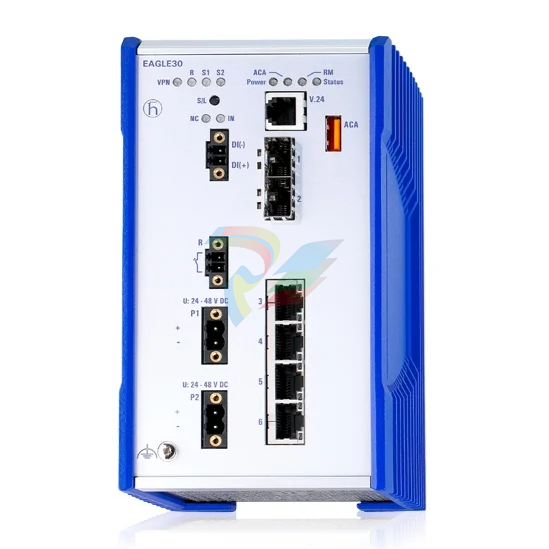
The Hirschmann (a Belden brand) EAGLE30-04022O6TT999SCCV9HSE3F is a high-performance, rail-mounted industrial firewall and security router. Operating on the HiSecOS (Hirschmann Security Operating System), it is designed to secure and isolate entire industrial networks using robust stateful packet inspection, virtual private network (VPN) encryption, and advanced Layer 3 routing capabilities.
Product Introduction / Overview
The EAGLE30 series represents the pinnacle of industrial cyber security, catering specifically to harsh substation, oil and gas, and manufacturing environments. This specific configuration (EAGLE30-04022O6TT999SCCV9HSE3F) features 6 communication ports in total: 4 Fast Ethernet RJ45 copper ports and 2 Gigabit SFP uplink slots.
Key Features
Enhanced Security Protection: Integrated stateful inspection firewall protecting against Denial of Service (DoS) attacks, unauthorized network penetration, and unapproved protocol access.
Industrial VPN Routing: Supports secure remote access utilizing IPSec VPN tunnels.
High Availability: Uses Virtual Router Redundancy Protocol (VRRP) for ultra-fast failover and network redundancy.
Designed for the Edge: Completely fanless, DIN-rail mountable IP20 housing designed to withstand massive industrial electromagnetic interference (EMI).
Technical Table
| Feature / Attribute | Specifications |
| Manufacturer & Brand | Hirschmann (Belden) |
| Model / Part Number | EAGLE30-04022O6TT999SCCV9HSE3F |
| Total Port Count | 6 ports |
| Ethernet Ports | 4 x 10/100BASE-TX (RJ45 copper ports) |
| Uplink Ports | 2 x SFP Gigabit slots (100/1000 Mbit/s) |
| Other Interfaces | 1 x RJ11 V.24 (serial console), 1 x USB (for ACA22), 1 x SD card slot (for ACA31) |
| Security Functions | Stateful inspection firewall, IPSec VPN, Layer 2 & 3 Access Control Lists (ACL) |
| Routing Protocols | Static routing, OSPFv2, 1-to-1 NAT, Port Forwarding, IP Masquerading |
| Operating Voltage | Dual redundant input: $2 times 24 / 36 / 48text{ VDC}$ ($18 text{ to } 60text{ VDC}$) |
| Power Consumption | Maximum 14 W (approx. $48text{ BTU/h}$) |
| Housing Dimensions | $90 times 164 times 120text{ mm}$ ($W times H times D$) |
| Weight | $1200text{ g}$ |
| Mounting & IP Rating | 35mm DIN-rail mount; IP20 protection class |
Environmental Tolerance Conditions
This unit is built to endure highly demanding physical conditions, making it suitable for field deployment in substations, heavy industrial plants, and roadside enclosures.
Operating Temperature: $0^circtext{C}$ to $+60^circtext{C}$ (Standard operating temperature variant).
Storage & Transport Temperature: $-40^circtext{C}$ to $+85^circtext{C}$.
Relative Humidity: 10% to 95% (strictly non-condensing).
Mechanical Shock Resistance: IEC 60068-2-27 compliance ($15text{ g}$ for $11text{ ms}$ duration, 18 total shocks).
Vibration Resistance: IEC 60068-2-6 compliance ($1text{ mm}$ displacement at $2text{ to } 13.2text{ Hz}$; $0.7text{ g}$ at $13.2text{ to } 100text{ Hz}$).
Operating Instructions
To configure and operate the EAGLE30 safely, follow this direct deployment sequence:
1.Physical DIN-Rail Installation:Prerequisite。
Mount the router vertically onto a grounded 35mm DIN rail. Ensure there is at least 5cm of ventilation space above and below the device for passive convection cooling.
2.Redundant Power Wiring:18 - 60 VDC。
Connect dual redundant DC power sources ($24text{V}$, $36text{V}$, or $48text{V}$) to the terminal block plugs (P1 and P2). Wire the ground screw directly to the main cabinet ground plane.
3.Local Access Setup:Console or Web。
Connect a PC to the V.24 RJ11 console port using the appropriate terminal cable, or connect to an RJ45 port and assign your PC a temporary IP in the 192.168.1.x subnet.
4.First-time Log in & Configuration:Initial Configuration。
Log in using default web credentials (HTTPS). The system will immediately prompt you to change the password on your first login. Follow the prompts to configure standard IP settings, firewall rules, and NAT tables.
5.SFP and Copper Port Deployment:Final Cabling。
Insert approved Hirschmann SFP modules into Gigabit slots 1 and 2 for WAN uplink. Connect your local downstream LAN devices to Fast Ethernet ports 3 through 6.
Fault Diagnosis
The device features built-in diagnostics via physical LEDs, syslog alarms, and signaling contacts.
Physical LED Diagnostic Guide
Power LEDs (P1/P2):
Green: Supply voltage is normal.
Off: No power or voltage drops below $18text{ VDC}$.
Status LED:
Red: Internal system fault or error in configuration.
Green (Blinking): Normal device startup or boot sequence.
ACA (Auto-Configuration Adapter) LED:
Red: ACA connected but contains an incompatible or corrupt config file.
Green: Configuration successfully loaded or synchronized with the external ACA key.
Link/Data LEDs (Ports 1-6):
Green: Link established.
Yellow (Flickering): Active transmission of data packets.
Off: No physical connection detected (check SFP compatibility or copper cable).
Related Models of the Same Series
The EAGLE series can be customized using a product configurator. Some common variations and related parts include:
EAGLE30-4TXSFP-EEC: Standard 6-port model similar to the EAGLE30 but featuring extended temperature range capabilities ($-40^circtext{C}$ to $+70^circtext{C}$).
EAGLE20-0400999: A lower-cost, 4-port Fast Ethernet configuration without Gigabit SFP slots or SHDSL support.
EAGLE30 with WAN/DSL: Configured with $2 times text{SHDSL}$ WAN interfaces to utilize legacy copper telephone lines.
ACA22-USB / ACA31: Auto-configuration adapter keys designed for backup, recovery, and instant configuration cloning on EAGLE devices.
Storage Conditions
To protect the electronic components, RAM, and internal clock capacitor of your EAGLE30 during prolonged storage periods, follow these guidelines:
Storage Specification Rules
Storage Temperature: Store in a controlled climate between $-40^circtext{C}$ and $+85^circtext{C}$.
Moisture Control: Maintain a dry environment (humidity $< 95%$, non-condensing). Desiccant packets should be packed inside the anti-static packaging.
Dust Mitigation: Store in its original anti-static box to protect copper contact interfaces and prevent particulate buildup inside the passive cooling fins.
| User name | Member Level | Quantity | Specification | Purchase Date |
|---|


-
CTI 2500 Series® Slice Ethernet Remote I/O System
-
CTI 500 Series® Compact Programmable Automation Control System
-
CTI 2500 Series® Classic Programmable Automation Control System
-
CTI 2500 Series® Bases
-
SHINKAWA VM-25 Condition Monitoring System UPDATED
-
SHINKAWA VM-5 SERIES OPTIONS
-
ABB SACO 64D4 Annunciator unit
-
ABB SPAU 140 C Synchro-check relay
-
HONEYWELL TDC 3000X Advanced Process Manager
-
HONEYWELL ENHANCED MICRO TDC 3000
-
VIBRO-METER VM600Mk2/ VM600 XMx16 + XIO16T extended condition monitoring modules
-
VIBRO-METER VM600Mk2/ VM600 RPS6U rack power supplies
-
VIBRO-METER VM600Mk2/ VM600 ABE056 slimline rack
-
VIBRO-METER VM600Mk2 RLC16Mk2 relay modules
-
VIBRO-METER VM600Mk2 MPC4Mk2 + IOC4Mk2 machinery protection and condition monitoring modules
-
VIBRO-METER VM600Mk2 CPUMMk2 + IOCNMk2 rack controller and communications interface module
-
VIBRO-METER VM600Mk2 CPUMMk2 + IOCNMk2 rack controller and communications interface module
-
ADLINK cPCI-8168 Advanced 6U CompactPCI 8-axis Motion Controller with One HSL Network
-
ADLINK PCI/PCIe-7300A, cPCI-7300 32-CH 80 MB/s High-Speed Digital I/O Cards
-
ADLINK cPCI-7248/7249R 48-CH DIO & Timer/Counter Cards
-
ADLINK PCI-7230/7233/7234. LPCI/LPCIe/cPCI-7230 32-CH Isolated DIO Cards
-
ADLINK cPCI-6965 Series Value 6U CompactPCI® Intel® Core™2 Duo
-
ADLINK cPCI-6910 Series 6U CompactPCI® Dual-Core Intel® Xeon® Processor LV / ULV Universal Blade
-
ADLINK CPCI-6670 6U CompactPCI Low Power Pentium® III SBC
-
ADLINK cPCI-6625/6 Series6U CompactPCI® PlusIO blade with Intel® Core™ i7/i3 Processor
-
ADLINK 3U CompactPCI CPU Modules
-
ADLINK CM-435 Extreme Rugged™ PC/104 Single Board Computer
-
ADLINK Centralized Motion Controllers PCI-8254/8258
-
ADLINK NuPRO-E43 PICMG® 1.3 Full-Size LGA1151 with 6th/7th Generation Intel® Core™ i7/i5/i3o
-
ADLINK DLAP-211-JNX/DLAP-211-JT2/ DLAP-211-Nano
-
نظام التحكم الرقمي في التحفيز الكهربائي BASLER DECS-200
-
Hirschmann RS30-1602O6O6SDAE compact OpenRail managed Ethernet switches
-
Hirschmann RS30-0802O6O6SDAE Ethernet switch
-
Hirschmann RS20-1600T1T1SDAE Management-type Ethernet switch
-
Hirschmann OCTOPUS 24M Limited Availability/Passive
-
Hirschmann MSP30-24040SCZ9MRHHE3A
-
Hirschmann MAR1040-4C4C4C4C9999SMMHRHHXX.X. Gigabit Ethernet Switch configurator
-
Hirschmann Industrial Ethernet Rail Switch SPIDER II, SPIDER II Giga, SPIDER II PoE
-
Hirschmann Industrial Ethernet Firewall EAGLE One
-
Hirschmann Industrial Security Router EAGLE20/30
-
Hirschmann Description and operating instructions RS2-xTX/xFX EEC
-
Basler Electric DIGITAL EXCITATION CONTROL SYSTEM DECS-300
-
Basler Electric DECS-200 Digital Excitation Control System
-
Basler Electric GENERATOR PROTECTION SYSTEM BE1-GPS100
-
Jaquet FT3000 Speed measurement system
-
Hirschmann Industrial Ethernet Ruggedized Switch MACH1000 Family
-
Basler Electric BESTCOMSPlus®
-
ETEL AccurET MODULAR 300 EA-P2M-300-xxxxxA controller
-
Basler Electric ES Series Protection Relays
-
ABB Multifunction Protection and Switchbay Control Unit REF542plus
-
EMERSON AMS 2140 Machinery Health Analyzer
-
Hirschmann Industrial Ethernet Rail Switch RS20 Basic Family
-
GE Grid Solutions P40U Px40 USB Adaptor
-
ABB ontinuous Gas Analyzers AO2000 Series AO2040CU Ex Central Unit in Category 2G
-
ABB Advance Optima AO2000 Series Continuous gas analyzers Models AO2020. AO2040
-
ABB Advance Optima Module Uras 14
-
SAACKE control optimization
-
SAACKE se@vis efficiency monitor
-
SAACKE se@vis pro
-
SAACKE se@vis eco
-
SAACKE se@vis compact
-
HIRSCHMANN Industrial ETHERNET Switch MICE MS20/MS30
-
HIRSCHMANN MICE Media modules
-
Kongsberg GL-10 Level Switch
-
B&R ACOPOSinverter P74 frequency converter
-
Beckhoff CX2020 | Basic CPU module (service phase)
-
Beckhoff CX1010 | Basic CPU module (service phase)
-
Beckhoff CX5120 | Embedded PC with Intel Atom® E3815
-
Beckhoff CP69xx-xxxx-0010 | Economy built-in Control Panel with DVI/USB Extended interface
-
Beckhoff CP29xx-0000 | Multi-touch built-in Control Panel with DVI/USB Extended interface
-
SAACKE Monoblock Rotary Cup Burner SKVJ-M
-
ABB Plantguard Fault Tolerant Technology Architecture and Software
-
OMRON H8PR-8/H8PR-8P H8PR-16/H8PR-16P H8PR-24/H8PR-24P Rotary Positioner
-
ABB PFSA107-Z42 DTU Stressometer Digital Transmission Unit
-
Nidec Mentor MP
-
IBA PC connection for high-precision data acquisition with ibaNet-E
-
IBA FO Connection to Reflective Memory
-
IBA FO Connection to Siemens Systems
-
IBA Interface Cards For Fiber Optic Connections
-
IBA Field and Drive Buses
-
IBA ibaPADU-S Modular System
-
IBA ibaMAQS
-
STUCKE SYMAP®ARC
-
STUCKE SYMAP®R
-
STUCKE SYMAP®Compact
-
MOOG G123-825-001 BUFFER AMPLIFIER
-
Motorola MVME5100 Series VME Processor Modules
-
ABB MEASUREMENT & ANALYTICS NGC8209 Natural gas chromatograph
-
Motorola MVME162 Embedded Controller
-
HIMatrix Safety-Related Controller System Manual for the Modular Systems
-
MOTOROLA MVME2400 Series VME Processor Module
-
Sieger System 57
-
KONGSBERG MRU product line continuation
-
Woodward easYgen-3100/3200 Genset Control for Multiple Unit Operation
-
Woodward MFR 300 Multifunction Relay / Measuring
-
ABB AX410, AX411, AX416, AX450 and AX455 Single and dual input analyzers
-
Woodward easYgen-1400 Technical Manual Genset Control
-
Woodward easYgen-400 Operation Manual Genset Control
-
Woodward High Output Digital Valve Positioner (DVP) DVP5000/DVP10000/DVP12000
-
Woodward High Output Digital Valve Positioner DVP5000 and DVP10000
-
Woodward TG611-13/-17 Overspeed Test Device Conversion Kit
-
Woodward MicroNet Safety Module (MSM)
-
Woodward 2301A Electronic Load Sharing and Speed Control 9905/9907 Series
-
Woodward-Service Bulletin 01671
-
UniOP eTOP40B 12.1” TFT color display
-
UniOP eTOP40 TFT Color display
-
UniOP eTOP33B 10.4” TFT color display
-
UniOP eTOP33C eTOP33-0050 Resistive touchscreen
-
UniOP eTOP30. eTOP32 eTOP32-0050 Human-machine interface equipment
-
UniOP eTOP20B and eTOP21B eTOP20B-0050
-
UniOP eTOP12 eTOP12-0050 Advanced human-machine interface equipment
-
UniOP eTOP11 eTOP11-0050 HMI
-
UniOP eTOP06 HMI
-
UniOP eTOP05EB eTOP05EB-DF45 HMI
-
UniOP eTOP05. eTOP05P Human-machine interface equipment
-
UniOP eTOP03 eTOP03-0046
-
UniOP eTOP507 507U2P1 eTOP Series 500 Human-Machine Interface
-
UniOP eTOP307
-
UniOP ePAD32B, ePAD33B and ePAD33BT ePAD33B-0350
-
UniOP ePAD05 and ePAD06
-
UniOP ePAD04 ePAD04-D046 Universal Operator Panel
-
UniOP ePAD03 and ePAD04
-
UniOP CP02F-02, CP02R-04
-
UniOP CP01R-04 Compact Human-Interface Device
-
UniOP ERT-16 - Industrial PLC Workstation
-
UniOP ePAD03 and ePAD04
-
UNIOP EPALM10-DA71 state-of-the-art handheld HMI
-
Watlow SERIES CLS200 SPECIFICATION SHEET

Add: High-tech Software Park, Xiamen City, Fujian Province
Mobile: +86-17750019513(WhatsApp)
Email: yy4291644@gmail.com
Website: https://www.abb-sis.com
.jpg)
.jpg)
.jpg)
.jpg)
.jpg)
.jpg)

-
DEIF RMF-112D Frequency relay
-
DEIF RMC-142D Current relay
-
DEIF RMC-132D Current relay
-
DEIF RMC-131D Current relay
-
DEIF RMC-122D Current relay
