


- SHINKAWA
- Beckhoff
- CTI
- Basler Electric
- ETEL
- Jaquet
- ADLINK
- SEL
- UNIOP
- Sieger
- Autronica
- SAMSUNG
- Stucke Elektronik
- Moore
- NI
- EMERSON
- IBA
- SST
- LEYBELOD
- SAMSUNG
- METSO
- AMAT
- Phoenix
- LAND
- LAMBDA
- Abaco
- Kongsberg
- ALFA LAVAL
- Pacific Scientific
- Others
- OMRON
- AMAT
- ICS Triplex
- Lam Research
- KUKA
- Hirschmann
- ELAU
- EATON
- Applicom
- Watlow Anafaze
- Meggitt Vibro-meter
- Carrier
- Other
- ROCKWELL
- Rolls-Royce
- SAACKE
- Yokogawa
- B&R
- Reliance Electric
- Seifert
- A-B
- Weimeide Metso
- KEBA
- HIMatrix
- Valmet
- Schneider
- Prosoft
- PEPPERL+FUCHS
- Honeywell
- Woodward
- GE
- GEA Westfalia Separator
- Bently Nevada
- ALSTOM
- Foxboro
- MOTOROLA
- Fanuc
- VMIC
- KOLLMORGEN
- SEW
- Rexroth
- AEROTECH
- TOSHIBA
- TmeIC
- Sumitomo
- SOCAPEL SOCASIN
- SMC
- Stromag
- SIEMENS
- SCHUMACHER
- ABB
- MOOG
- EPRO
- EMERSON
- Triconex
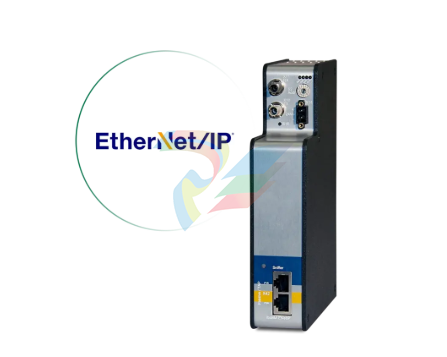
IBA ibaBM-ENetIP Bus monitor for EtherNet/IP
ibaBM-ENetIP: Bus monitor for EtherNet/IP
TAP interface for sniffer function
Data acquisition with ibaPDA
Simple configuration and measurement via bidirectional fiber optic connection with ibaNet protocol 32Mbit Flex
Flexible adjustment of sampling rate and data formats with 32Mbit Flex
Monitor interface for connecting a network analysis tool
Battery compartment X30
The internal time is buffered with a 3V Lithium CR2032 battery. The battery can be re
placed during operation.
Observe the correct polarity of the battery.
Connection to networks
ibaDAQ-C can be operated in two different networks to separate for example the network
for measuring data transmission from the rest of the network. For this prupose the device
provides 2 Ethernet interfaces. For setting the addresses in the networks, please refer
to chapter 7.3.2.
Connection with USB-WLAN/RJ45 adapter
Using a USB-WLAN or USB-RJ45 adapter at the USB interface is another possibility to
operate ibaDAQ-C in two different networks. There is no need for a special adapter type.
Any commercial adapter that supports Windows 10 or higher can be used for this pur
pose. However, the corresponding drivers need to be installed on the device.
Operation with compact UPS
In order to secure an optimal operation, it is recommended to buffer the power supply of
the ibaDAQ-C system via an uninterruptible power supply (UPS) with additional digital
output. For this purpose, the digital output of the UPS serves as signal for securely shut
ting down the ibaDAQ-C operating system. The UPS should be designed in such a way
that the system is buffered for at least 5 minutes.
Configuration in ibaPDA
ibaPDA allows you to configure, acquire and record the analog and digital signals of the
connected modules.
For the configuration you can connect the input devices (monitor, mouse, keyboard) di
rectly to the unit. In this case, continue with chapter 9.2.
If you are using an external ibaPDA client for configuration, continue with the next chapter
9.1.
Connection with an external ibaPDA client
If you are using an external ibaPDA client for the configuration, the ibaPDA client and
ibaDAQ-C have to be connected via the network.
Start ibaPDA on the external ibaPDA client and select ibaDAQ-C as ibaPDA server.
Address
Enter the name or the IP address of the ibaDAQ-C device in the “Address” field. The
name is composed of the DAQ-C-
on the device name plate.
Example: DAQ-C-000003.
Port-no.
The port number is assigned automatically.
The
This button starts and stops the search for active ibaPDA servers in the network. If the ibaPDA client and ibaDAQ-C are located in the same network, the device should be displayed in the list of servers. The device can be selected either by double-clicking the device or by selecting it and subsequently clicking For further configuration activities, open the I/O Manager as described in the next chap ter. ibaDAQ-C configuration The following settings are made in the ibaDAQ-C node: Configuration of the interrupt source, see chapter 9.2.1 Network settings of the device, see chapter 9.2.2 Firmware update and restarting the device, see chapter 9.2.2 User-defined signal assignment of the LEDs PDA1 and PDA2. see chapter 9.2.2 Connection of further modules and communication interfaces, see chapter 9.3. Reboot device Click this button to restart the device. Network settings The settings of IP address, subnet mask and DHCP server are only available if the rotary switch S1 is set to "0". Use DHCP Here you can select separately for the two network interfaces X21 and X22 whether a DHCP server is used or not. IP address Here you can enter a user-defined IP address for the network interfaces X21 and X22. The option "Use DHCP server" must not be enabled to do so. Subnet mask Enter the suitable subnet mask for you network here. The option "Use DHCP server" must not be enabled to do so.REL511C-2 Line distance protection terminal for impedance grounded networks MVME3100-1152 MVME3100 Series VMEbus Single-Board Computer 140CPU67160S CPU Schneider Modicon MG3-1G-1G-PM MG SERIES AC-DC POWER SUPPLIES GSM40-0602-MEF-AB7-238-XM-36269 GSM Series Linear Actuators with Integrated Motor HVE04.2-W075N/S202 HVE Power Supply Units BUM60-1224-54-B-001-VC-VO Controllers PPC-R22.1N-T-Q2-G2-NN-FW PPC Controllers 80190-560-02-R PCB Gate Drive Board VT-HNC100-1-23-W-08-P-0 R900958999 servo controller IS200VAICH1GBA VME Analog Input Card IS200AEADH4ADA Speedtronic Turbine Control PCB board C7061A1020-ST001 Dynamic Self-Check Ultraviolet Flame Detector XV-363-10-C02-A00-1B XV300 advanced human machine interface (HMI) 3500/42-04-R0 Proximitor Seismic Monitor XV-363-10-C02-A00SI3 XV300 advanced human machine interface (HMI) MMS3110/020-020 Shaft-Vibration Monitor IS200VTURH1BAC Mark V Primary Turbine Protection board XV-303-70-B00-400-1B XV300 advanced human machine interface (HMI) AAI143-H50/A4S00 Analog I/O Modules (for FIO) RET620 NCTNAAAANDCBNNIXF Transformer protection and control RET620 IEC REF610C11HCHN Feeder protection IS200TRPAH2AFD Gas turbine card module
| User name | Member Level | Quantity | Specification | Purchase Date |
|---|


-
CTI 2500 Series® Slice Ethernet Remote I/O System
-
CTI 500 Series® Compact Programmable Automation Control System
-
CTI 2500 Series® Classic Programmable Automation Control System
-
CTI 2500 Series® Bases
-
SHINKAWA VM-25 Condition Monitoring System UPDATED
-
SHINKAWA VM-5 SERIES OPTIONS
-
ABB SACO 64D4 Annunciator unit
-
ABB SPAU 140 C Synchro-check relay
-
HONEYWELL TDC 3000X Advanced Process Manager
-
HONEYWELL ENHANCED MICRO TDC 3000
-
VIBRO-METER VM600Mk2/ VM600 XMx16 + XIO16T extended condition monitoring modules
-
VIBRO-METER VM600Mk2/ VM600 RPS6U rack power supplies
-
VIBRO-METER VM600Mk2/ VM600 ABE056 slimline rack
-
VIBRO-METER VM600Mk2 RLC16Mk2 relay modules
-
VIBRO-METER VM600Mk2 MPC4Mk2 + IOC4Mk2 machinery protection and condition monitoring modules
-
VIBRO-METER VM600Mk2 CPUMMk2 + IOCNMk2 rack controller and communications interface module
-
VIBRO-METER VM600Mk2 CPUMMk2 + IOCNMk2 rack controller and communications interface module
-
ADLINK cPCI-8168 Advanced 6U CompactPCI 8-axis Motion Controller with One HSL Network
-
ADLINK PCI/PCIe-7300A, cPCI-7300 32-CH 80 MB/s High-Speed Digital I/O Cards
-
ADLINK cPCI-7248/7249R 48-CH DIO & Timer/Counter Cards
-
ADLINK PCI-7230/7233/7234. LPCI/LPCIe/cPCI-7230 32-CH Isolated DIO Cards
-
ADLINK cPCI-6965 Series Value 6U CompactPCI® Intel® Core™2 Duo
-
ADLINK cPCI-6910 Series 6U CompactPCI® Dual-Core Intel® Xeon® Processor LV / ULV Universal Blade
-
ADLINK CPCI-6670 6U CompactPCI Low Power Pentium® III SBC
-
ADLINK cPCI-6625/6 Series6U CompactPCI® PlusIO blade with Intel® Core™ i7/i3 Processor
-
ADLINK 3U CompactPCI CPU Modules
-
ADLINK CM-435 Extreme Rugged™ PC/104 Single Board Computer
-
ADLINK Centralized Motion Controllers PCI-8254/8258
-
ADLINK NuPRO-E43 PICMG® 1.3 Full-Size LGA1151 with 6th/7th Generation Intel® Core™ i7/i5/i3o
-
ADLINK DLAP-211-JNX/DLAP-211-JT2/ DLAP-211-Nano
-
نظام التحكم الرقمي في التحفيز الكهربائي BASLER DECS-200
-
Hirschmann RS30-1602O6O6SDAE compact OpenRail managed Ethernet switches
-
Hirschmann RS30-0802O6O6SDAE Ethernet switch
-
Hirschmann RS20-1600T1T1SDAE Management-type Ethernet switch
-
Hirschmann OCTOPUS 24M Limited Availability/Passive
-
Hirschmann MSP30-24040SCZ9MRHHE3A
-
Hirschmann MAR1040-4C4C4C4C9999SMMHRHHXX.X. Gigabit Ethernet Switch configurator
-
Hirschmann Industrial Ethernet Rail Switch SPIDER II, SPIDER II Giga, SPIDER II PoE
-
Hirschmann Industrial Ethernet Firewall EAGLE One
-
Hirschmann Industrial Security Router EAGLE20/30
-
Hirschmann Description and operating instructions RS2-xTX/xFX EEC
-
Basler Electric DIGITAL EXCITATION CONTROL SYSTEM DECS-300
-
Basler Electric DECS-200 Digital Excitation Control System
-
Basler Electric GENERATOR PROTECTION SYSTEM BE1-GPS100
-
Jaquet FT3000 Speed measurement system
-
Hirschmann Industrial Ethernet Ruggedized Switch MACH1000 Family
-
Basler Electric BESTCOMSPlus®
-
ETEL AccurET MODULAR 300 EA-P2M-300-xxxxxA controller
-
Basler Electric ES Series Protection Relays
-
ABB Multifunction Protection and Switchbay Control Unit REF542plus
-
EMERSON AMS 2140 Machinery Health Analyzer
-
Hirschmann Industrial Ethernet Rail Switch RS20 Basic Family
-
GE Grid Solutions P40U Px40 USB Adaptor
-
ABB ontinuous Gas Analyzers AO2000 Series AO2040CU Ex Central Unit in Category 2G
-
ABB Advance Optima AO2000 Series Continuous gas analyzers Models AO2020. AO2040
-
ABB Advance Optima Module Uras 14
-
SAACKE control optimization
-
SAACKE se@vis efficiency monitor
-
SAACKE se@vis pro
-
SAACKE se@vis eco
-
SAACKE se@vis compact
-
HIRSCHMANN Industrial ETHERNET Switch MICE MS20/MS30
-
HIRSCHMANN MICE Media modules
-
Kongsberg GL-10 Level Switch
-
B&R ACOPOSinverter P74 frequency converter
-
Beckhoff CX2020 | Basic CPU module (service phase)
-
Beckhoff CX1010 | Basic CPU module (service phase)
-
Beckhoff CX5120 | Embedded PC with Intel Atom® E3815
-
Beckhoff CP69xx-xxxx-0010 | Economy built-in Control Panel with DVI/USB Extended interface
-
Beckhoff CP29xx-0000 | Multi-touch built-in Control Panel with DVI/USB Extended interface
-
SAACKE Monoblock Rotary Cup Burner SKVJ-M
-
ABB Plantguard Fault Tolerant Technology Architecture and Software
-
OMRON H8PR-8/H8PR-8P H8PR-16/H8PR-16P H8PR-24/H8PR-24P Rotary Positioner
-
ABB PFSA107-Z42 DTU Stressometer Digital Transmission Unit
-
Nidec Mentor MP
-
IBA PC connection for high-precision data acquisition with ibaNet-E
-
IBA FO Connection to Reflective Memory
-
IBA FO Connection to Siemens Systems
-
IBA Interface Cards For Fiber Optic Connections
-
IBA Field and Drive Buses
-
IBA ibaPADU-S Modular System
-
IBA ibaMAQS
-
STUCKE SYMAP®ARC
-
STUCKE SYMAP®R
-
STUCKE SYMAP®Compact
-
MOOG G123-825-001 BUFFER AMPLIFIER
-
Motorola MVME5100 Series VME Processor Modules
-
ABB MEASUREMENT & ANALYTICS NGC8209 Natural gas chromatograph
-
Motorola MVME162 Embedded Controller
-
HIMatrix Safety-Related Controller System Manual for the Modular Systems
-
MOTOROLA MVME2400 Series VME Processor Module
-
Sieger System 57
-
KONGSBERG MRU product line continuation
-
Woodward easYgen-3100/3200 Genset Control for Multiple Unit Operation
-
Woodward MFR 300 Multifunction Relay / Measuring
-
ABB AX410, AX411, AX416, AX450 and AX455 Single and dual input analyzers
-
Woodward easYgen-1400 Technical Manual Genset Control
-
Woodward easYgen-400 Operation Manual Genset Control
-
Woodward High Output Digital Valve Positioner (DVP) DVP5000/DVP10000/DVP12000
-
Woodward High Output Digital Valve Positioner DVP5000 and DVP10000
-
Woodward TG611-13/-17 Overspeed Test Device Conversion Kit
-
Woodward MicroNet Safety Module (MSM)
-
Woodward 2301A Electronic Load Sharing and Speed Control 9905/9907 Series
-
Woodward-Service Bulletin 01671
-
UniOP eTOP40B 12.1” TFT color display
-
UniOP eTOP40 TFT Color display
-
UniOP eTOP33B 10.4” TFT color display
-
UniOP eTOP33C eTOP33-0050 Resistive touchscreen
-
UniOP eTOP30. eTOP32 eTOP32-0050 Human-machine interface equipment
-
UniOP eTOP20B and eTOP21B eTOP20B-0050
-
UniOP eTOP12 eTOP12-0050 Advanced human-machine interface equipment
-
UniOP eTOP11 eTOP11-0050 HMI
-
UniOP eTOP06 HMI
-
UniOP eTOP05EB eTOP05EB-DF45 HMI
-
UniOP eTOP05. eTOP05P Human-machine interface equipment
-
UniOP eTOP03 eTOP03-0046
-
UniOP eTOP507 507U2P1 eTOP Series 500 Human-Machine Interface
-
UniOP eTOP307
-
UniOP ePAD32B, ePAD33B and ePAD33BT ePAD33B-0350
-
UniOP ePAD05 and ePAD06
-
UniOP ePAD04 ePAD04-D046 Universal Operator Panel
-
UniOP ePAD03 and ePAD04
-
UniOP CP02F-02, CP02R-04
-
UniOP CP01R-04 Compact Human-Interface Device
-
UniOP ERT-16 - Industrial PLC Workstation
-
UniOP ePAD03 and ePAD04
-
UNIOP EPALM10-DA71 state-of-the-art handheld HMI
-
Watlow SERIES CLS200 SPECIFICATION SHEET

Add: High-tech Software Park, Xiamen City, Fujian Province
Mobile: +86-17750019513(WhatsApp)
Email: yy4291644@gmail.com
Website: https://www.abb-sis.com
.jpg)
.jpg)
.jpg)
.jpg)
.jpg)
.jpg)

-
AEROTECH SM Series High-Performance Stepper Motors
-
AEROTECH BLMSC Series Linear Motors
-
AEROTECH Custom Linear Motors
-
AEROTECH BMS Series Brushless, Slotless Rotary Motors
-
AEROTECH BM Series Brushless Rotary Motors
