

Pressductor Pillowblock Load Cells Vertical Measuring PFCL 201 User manual
• The screws that secure the load cell must be tightened with a torque wrench.
• The bearing arrangement for the measuring roll must be designed to allow axial expansion of the roll with changes in temperature.
• Any drive to the roll must be applied in such a way that interfering forces from the drive are kept to a minimum.
• The measuring roll must be dynamically balanced.
• The mounting surfaces of the load cells must be on the same height and parallel with the measuring roll.
• In a corrosive environment, galvanic corrosion may occur between the load cell, galvanized screws and adapter plates. This makes it necessary to use stainless steel screws and adapter plates of stainless steel or equivalent. See adapter plates in
Unpacking
When the equipment arrives, check against the delivery document. Inform ABB of any complaint, so that errors can be corrected immediately and delays avoided.
Preparations
Prepare the installation in good time by checking that the necessary documents and material are available, as follows:
• Installation drawings and this manual.
• Standard tools, torque wrench and instruments.
• Rust protection, if additional protection is to be given to machined surfaces. Choose TEC TYL 511 (Valvoline) or FERRYL (104), for example.
• Load cells, adapter plates, bearing housings, etc.
• Locking fluid (medium strength) to lock mounting screws.
• Screws as listed in Table 3. page 19 and Table 4. page 19 to secure the load cell, and other screws for bearing housings etc.
Mounting
The instructions below apply to a typical mounting arrangement. Variations may be allowed, provi ded that the requirements of 3.1 General are complied with.
Clean the foundation and other mounting surfaces.
2. Fit the lower adapter plate to the load cell. Tighten the screws to the torque stated in Table
3. page 19 or Table 4. page 19. 3. Fit the load cell and the lower adapter plate to the foundation, but do not fully tighten the screws.
4. Fit the upper adapter plate to the load cell, tighten to the torque stated in Table 3. page 19 or Table 4. page 19.
5. Fit the bearing housing and the roll to the upper adapter plate, but do not fully tighten the screws.
6. Adjust the load cells so that they are in parallel with each other and in line with the axial direction of the roll. Torque tighten the foundation screws.
7. Adjust the roll so that it is at right angles to the longitudinal direction of the load cells.Torque tighten the screws in the upper adapter plate.
8. Apply rust protection to any machined surfaces that are not rust proof.
Cabling for Load Cell PFCL 201CE
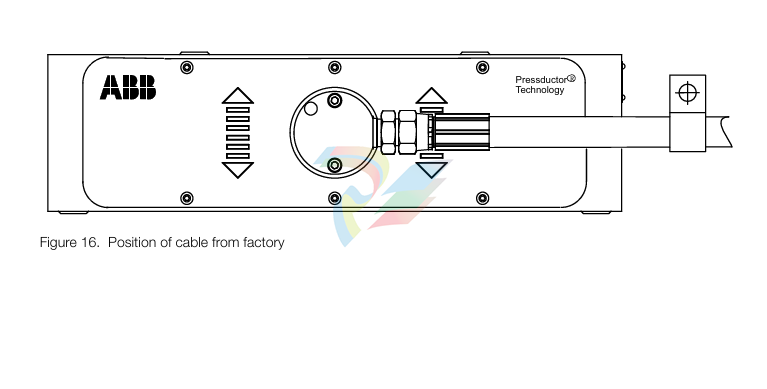
Cabling with protective hose shall be mounted so that the forces related to the weight of the cable/ hose do not act in the measuring direction of the load cell. A cable clamp is therefore necessary. If the load cell is prevented from movement in the measuring direction- it will shunt force, and the measured force will differ from the actual.
The favourable direction of the cable/hose is the horizontal direction to the left or right as indicated in Figure 16. Position of cable from factory page 20. This as possible forces in the longitudinal direction of the cable/hose due to temperature, will act perpendicular to the measuring direction of the load cell (the direction in which the load cell is insensitive to loads).
For achievable cable directions, see Figure 17. Possible directions of cable for PFCL 201CE page 21. The direction of the cable and protective hose can be changed by unscrewing the two screws in the connection box and turning the cable to a suitable direction. Make sure to re-install the screws in the connection box.
General
The actual procedure for commissioning a load cell is simple, provided that the load cells and cables have been properly installed. Commissioning of the control unit is described in the relevant chapter of the control unit manual.
Check the following:
• that the load cells have been correctly installed and aligned
• that all screws have been tightened to the correct torque
• that all cables are correctly installed and connected
• that all connectors are plugged in
Preparatory Calculations
To be able to set the correct measuring range, the measurement force per load cell FR/2 at maxi mum tension T must be calculated. Each load cell is subjected to half the total measurement force FR. This calculation must be done before commissioning can begin. Calculation of FR is described in 2.5 Mounting Arrangement.
Maintenance
General
Strip Tensiometer Systems with Pressductor® load cells are extremely reliable and do not require daily servicing. As a preventive measure, checks should be done periodically on all parts subject to mechanical wear.
Preventive Maintenance
Check mounting screws and tighten if necessary.
The gaps between load cell and plates should be checked to ensure that they do not get clogged with dirt, causing shunt force past the load cell. Clean the gaps with compressed air if necessary. The cable between the load cell and the junction box is subjected to possible damage and should be checked and replaced if necessary.
-
CTI 2500S-27-1750 Slice I/O, Ethernet, RS232/485. 900MHz, 2DIO / 4UAI / 2AI
-
CTI 2500S-26-1750 Slice I/O, Ethernet, RS232/485. 900MHz, 8DIO / 2UAI
-
CTI 2500S-23-1750 Slice I/O, Ethernet, RS232/485. 900MHz, 4DI / 4DO / 2UAI / 2AO
-
CTI 2500S-27-1550 Slice I/O, RS232/485. 2DIO / 4UAI / 2AI
-
CTI 2500S-26-1550 Slice I/O, RS232/485. 8DIO / 2UAI
-
CTI 2500S-23-1550 Slice I/O, RS232/485. 4DI / 4DO / 2UAI / 2AO
-
CTI 2500S-27-1050 Slice I/O, Ethernet, 2DIO / 4UAI / 2AI
-
CTI 2500S-26-1050 Slice I/O, Ethernet, 8DIO / 2UAI
-
CTI 2500S-23-1050 Slice I/O, Ethernet, 4DI / 4DO / 2UAI / 2AO
-
CTI 2500C-32F-CJC 32-Pin Field Wiring Connector with Cold Junction Compensation
-
CTI 2500C-32F 32-Pin Field Wiring Connector
-
CTI 2500C-8-TC Eight Thermocouple Inputs
-
CTI 2500C-8-RTD Eight RTD Inputs
-
CTI 2500C-8-RL-FC 8 Form-C Relay Outputs
-
CTI 2500C-8-IDO-24V 8 Isolated 24VDC Outputs
-
CTI 2500C-8-IDO-120V 8 Isolated 120VAC Outputs
-
CTI 2500C-16-DO-24V Sixteen 24VDC Digital Outputs
-
CTI 2500C-16-DO-120V Sixteen 120VAC Digital Outputs
-
CTI 500C-16-IDI-24V Sixteen Isolated 24V AC/DC Digital Inputs
-
CTI 2500C-16-IDI-120V Sixteen Isolated 120V AC/DC Digital Inputs
-
CTI 2500C-16-DIDO-SIM Sixteen Digital Input and Output SImulator
-
CTI 2500C-16-DI-24V Sixteen 24V AC/DC Digital Inputs
-
CTI 2500C-16-DI-120V Sixteen 120V AC/DC Digital Inputs
-
CTI 2500C-RBC-RS485 RS485 Remote Base Controller
-
CTI 2500C-RBC-PRF Profibus Remote Base Controller
-
CTI 2500C-PS-24V-35 35-Watt DC Power Supply
-
CTI 2500C-PS-120V-35 35-Watt AC Power Supply
-
CTI 2500C-R8 Eight-Slot Base
-
CTI 2500C-R4 Four-Slot Base
-
CTI 2500C-R16 Sixteen-Slot Base
-
CTI 2500C-2572-B Fast Ethernet TCP/IP Adapter
-
CTI 2500C-J750 Compact Janus PAC with 3MB Project Memory
-
CTI 2500C-C300 CPU with 512K User Memory
-
CTI 2500C-C200 CPU with 256K User Memory
-
CTI 2500C-C100 CPU with 128K User Memory
-
CTI 2500C-8-AO 8 Analog Outputs
-
CTI 2500C-8-AI 8 Analog Inputs
-
CTI 2559-FCAL Precision Calibration Connector
-
CTI 2559-FPC 2559-FPC 40-pin screw terminal connector
-
CTI 2500-RFC PLC to RF Modem Cable
-
CTI 2500-40F 40-Position Standard Screw-Terminal Connector
-
CTI 2505 Vibration Sensor Interface Module
-
CTI 2554-A 4-Channel Isolated High Speed Counter Module
-
CTI 2553-A 2-Channel Mag Meter Input Module
-
CTI 2502 2-Channel High Speed Counter Input Module
-
CTI 2559-TC 8-Channel Thermocouple Input Module
-
CTI 2556-A 16-Channel Isolated Thermocouple Input Module
-
CTI 2556 16-Channel Isolated Thermocouple Input Module
-
CTI 2551-A 8-Channel Isolated Thermocouple Input Module
-
CTI 2559-RTD 8-Channel RTD Input Module
-
CTI 2557-A 16-Channel RTD Input Module
-
CTI 2557 16-Channel RTD Input Module
-
CTI 2552-A 8-Channel Isolated RTD Input Module
-
CTI 2534 8-Point Form-C Relay Output Module
-
CTI 2532 16-Point Form-A Relay Output Module
-
CTI 2531 32-Point Form-A Relay Output Module
-
CTI 2530 8-Point Form-C Relay Output Module
-
CTI 2562 8-Channel Analog Output Module
-
CTI 2560-A 8-Channel Isolated Analog Output Module
-
CTI 2501 8in/4out Analog Module
-
CTI 2558 8-Channel Analog Input Module
-
CTI 2555-A 16-Channel Analog Input Module
-
CTI 2550-A 8-Channel Isolated Analog Input Module
-
CTI 2599 8/16/32-Point AC Output Module
-
CTI 2598-8 8-Point AC Output Module
-
CTI 2598 8/16-Point AC Output Module
-
CTI 2597 8/16/32-Point DC Output Module
-
CTI 2596-8 8-Point DC Output Module
-
CTI 2596 8/16-Point DC Output Module
-
CTI 2595 16-Point TTL/Word Output Module
-
CTI 2591-EF 16-Point Isolated 11-146 VDC Output with Front Panel Accessible Fuses
-
CTI 2591-A 16-Point Isolated 11-146 VDC Output Module
-
CTI 2590-EF 16-Point Isolated 20-132 VAC Output with Front Panel Accessible Fuses
-
CTI 2590-A 16-Point Isolated Discrete 20-132 VAC Output Module
-
CTI 2589-B 8/16/32-Point Universal Discrete Input Module
-
CTI 2589-A 8/16/32-Point Universal Discrete Input Module
-
CTI 2588-8 8-Point Universal Discrete Input Module
-
CTI 2585 16-Point TTL/Word Input Module
-
CTI 2582 16-Point Isolated 125 VDC Input Module
-
CTI 2581 16-Point Isolated 12-56 VDC Input Module
-
CTI 2580 16-Point Isolated 95-132 VAC Input Module
-
CTI 2500-TAP RS485 Network Tap
-
CTI 2500-RIO-B RS485 Remote Base Controller
-
CTI 2500-RIO-A RS485 Remote Base Controller
-
CTI 2500-RBC Profibus Remote Base Controller
-
CTI 2515-A 100-Watt AC/DC Power Supply with Redundancy Support
-
CTI 2515 100-Watt AC Power Supply (MATURE - replaced by 2515-A)
-
CTI 2513-A 75-Watt DC Power Supply with Redundancy Support
-
CTI 2513 75-Watt 24VDC Power Supply
-
CTI 2512-A 75-Watt AC/DC Power Supply with Redundancy Support
-
CTI 2512 75-Watt AC/DC Power Supply
-
CTI 2510 125 VDC Power Supply
-
CTI 2500-SSB Single Slot Blank Front Panel
-
CTI 2500-R11-A Eleven-Slot Redundant Base
-
CTI 2500P-R16 Sixteen-Slot Base with High-Speed Channel
-
CTI 2500P-R8 Eight-Slot Base with High-Speed Channel
-
CTI 2500P-R4 Four-Slot Base with High-Speed Channel
-
CTI 2541 Redundant Processor Manager Module
-
CTI 2577 Profibus DP Slave Adapter
-
CTI 2573-MOD Serial Interface Adapter with MODBUS
-
CTI 2572-AF Fast Ethernet TCP/IP Adapter with Optical Fiber Connection
-
CTI 2572-A Fast Ethernet TCP/IP Adapter
-
CTI 2572 Ethernet TCP/IP Adapter
-
CTI 2572-B Fast Ethernet TCP/IP Adapter
-
CTI 2576 DeviceNet™ Scanner Module (MATURE)
-
CTI 2500P-ECC1 Ethernet Communications Coprocessor
-
CTI 2500P-JACP Janus Application Coprocessor
-
CTI 2500P-ACP1 Application Coprocessor (MATURE - replaced by 2500P-JACP)
-
CTI 2500P-J450 Janus PAC with 2MB Project Memory
-
CTI 2500-C400 CPU with 3072K User Memory
-
CTI 2500-C300 CPU with 512K User Memory
-
CTI 2500-C200 CPU with 256K User Memory
-
CTI 2500-C100 CPU with 128K User Memory
-
CTI 2500P-J750 Janus PAC with 3MB Project Memory
-
Shinkawa WHF3006M Displacement Converter
-
Shinkawa JBP-220 (P-24-94A / P-24-94B) Circuit Board Module
-
SHINKAWA WKN-142K5 2-WIRE VIBRATION TRANSDUCER
-
Shinkawa FRP-321 (P-26-54A / P-26-54B) Circuit Board Module
-
Shinkawa IOP-160 (P-25-72A / P-25-72B) Circuit Board Module
-
Shinkawa PK-147B-1 / PK-147A-1 Circuit Board Module
-
Shinkawa CPP-91A Circuit Board Module
-
Shinkawa FRP-177 PCB Module
-
Shinkawa CPP-127 (P-26-74A / P-26-74B) Circuit Board Module
-
Shinkawa FRP-227 (P-24-86A / P-24-86B) Circuit Board Module
-
Shinkawa MDP-104 (P-25-83A / P-25-83B) Circuit Board Controller
-
Shinkawa VK-143P2 High-precision eddy current sensor driver/signal conditioner
-
Shinkawa FRP-226 (P-24-86A / P-24-86B) Circuit Board Module
-
Shinkawa CPP-107A P-22-99A P-22-99B Circuit Board Module

Add: High-tech Software Park, Xiamen City, Fujian Province
Mobile: +86-17750019513(WhatsApp)
Email: yy4291644@gmail.com
Website: https://www.abb-sis.com
.jpg)
.jpg)
.jpg)
.jpg)
.jpg)
.jpg)

-
CTI 2500S-27-1750 Slice I/O, Ethernet, RS232/485. 900MHz, 2DIO / 4UAI / 2AI
-
CTI 2500S-26-1750 Slice I/O, Ethernet, RS232/485. 900MHz, 8DIO / 2UAI
-
CTI 2500S-23-1750 Slice I/O, Ethernet, RS232/485. 900MHz, 4DI / 4DO / 2UAI / 2AO
-
CTI 2500S-27-1550 Slice I/O, RS232/485. 2DIO / 4UAI / 2AI
-
CTI 2500S-26-1550 Slice I/O, RS232/485. 8DIO / 2UAI
