

GE VMIVME-7807 VME-7807RC* Intel® Pentium® M-Based VME SBC
Pentium® M-based, single board computers (SBCs) in a single-slot, passively cooled,
VME Eurocard form factor. These products utilize the advanced technology of Intel®’s
855GME chipset.
VMIVME-7807
VME-7807RC*
Intel® Pentium® M-Based VME SBC
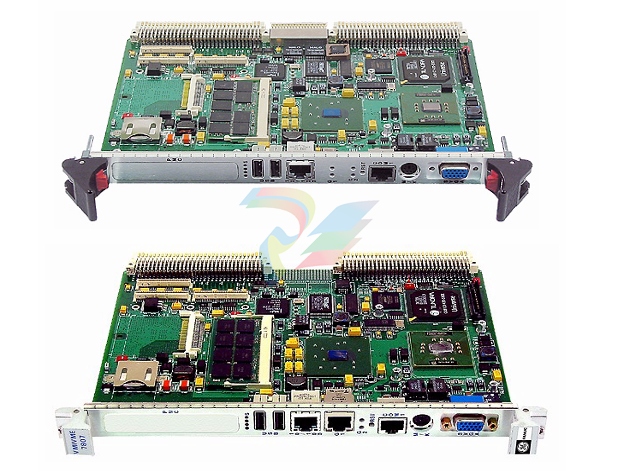
GE Fanuc Embedded Systems’ VMIVME-7807/VME-7807RC are full featured
Pentium® M-based, single board computers (SBCs) in a single-slot, passively cooled,
VME Eurocard form factor. These products utilize the advanced technology of Intel®’s
855GME chipset.
The VMIVME-7807/VME-7807RC provide features typically found on desktop
systems such as:
• 1.0GB DDR SDRAM using one SODIMM and an optional 512MB of solder-in
memory for a maximum of 1.5GB
• Built-in SVGA support (front panel connection)
• Digital video controller (rear I/O) DVI-D with dual head display capabilities
• 10/100 Mbit Ethernet controller (front panel connection)
• Dual Gigabit Ethernet supporting (front panel or rear I/O)
• Optional P0 with VITA 31.1 interface
• Serial ATA (SATA) support (rear I/O)
• Serial port COM1 (front panel connection)
• Ultra IDE drive support (rear I/O)
• Real-Time clock/calendar
• Front panel reset switch
• Miniature speaker
• Keyboard/Mouse port (front panel connection)
The 855GME chipset allows the VMIVME-7807/VME-7807RC to provide enhanced
features such as integrated video and Ultra ATA/100 IDE support. The
VMIVME-7807/VME-7807RC are capable of executing many of today’s desktop
operating systems such as Microsoft®’s Windows® XP, Windows 2000 and a wide
variety of Linux® based operating systems. The standard desktop features of the
VMIVME-7807/VME-7807RC are described in Chapter 2 of this manual.
The VMIVME-7807/VME-7807RC provide features useful to embedded applications
such as:
• Three serial ports: COM2. COM3 and COM4 (rear I/O)
• Four USB 2.0 ports (two on front panel and two rear I/O)
• 32KB of nonvolatile RAM
• Remote Ethernet booting
• Up to 2GB of CompactFlash on secondary IDE (optional)
• Software-selectable Watchdog Timer with reset
Additionally, the VMIVME-7807/VME-7807RC offer one PMC expansion site (PCI-X,
66MHz) with front panel access. The VMIVME-7807/VME-7807RC are capable of
executing many of today’s operating systems such as VxWorks®, Solaris™ or QNX®.
The embedded features of the VMIVME-7807/VME-7807RC are described in
Chapter 3 of this manual.
The VMIVME-7807/VME-7807RC are suitable for use in applications ranging from
telecommunications, simulation, instrumentation, industrial control, process control
and monitoring, factory automation, automated test systems, data acquisition
systems and anywhere that the highest performance processing power in a single
VME slot is desired.
The VMIVME-7807/VME-7807RC conform to the VME physical specification for a 6U
board. The VMIVME-7807/VME-7807RC can be used for system control or as a
peripheral board. They can be plugged directly into any standard chassis accepting
either type of board.
The following steps describe the GE Fanuc Embedded Systems-recommended
method for installation and powerup of the VMIVME-7807/VME-7807RC :
1. If a PMC module is to be used, connect it to the VMIVME-7807/VME-7807RC
prior to board installation (as shown in Figure 1-2 on page 29). Refer to the
Product Manual for the PMC module for configuration and setup.
2. Insert the VMIVME-7807/VME-7807RC into a VME chassis system controller or
peripheral slot. While ensuring that the board is properly aligned and oriented
in the supporting board guides, slide the board smoothly forward against the
mating connectors. Use the ejector handles to firmly seat the board.
3. All needed peripherals can be accessed from the front panel or the rear I/O
VMIACC-0586/ACC-0586RC or VMIACC-0590/ACC-0590RC Rear Transition
Modules (RTMs). Each connector is clearly labeled on the front panel and
detailed pinouts are in Appendix A.
4. Connect a keyboard and mouse if the system has not been previously
configured.
5. The VMIVME-7807/VME-7807RC feature an optional CompactFlash Disk
resident on the board. Refer to Chapter 3 for set up details.
6. If an external drive module is installed, the BIOS Setup program must be used to
configure the drive types. See Appendix B to properly configure the system.
7. If a drive module is present, install the operating system according to the
manufacturer’s instructions.
The VMIVME-7807/VME-7807RC have an onboard BIOS Setup program that controls
many configuration options. These options are saved in a special non-volatile,
battery-backed memory chip and are collectively referred to as the board’s ‘CMOS
Configuration’. The CMOS configuration controls many details concerning the
behavior of the hardware from the moment power is applied.
Details of the VMIVME-7807/VME-7807RC BIOS setup program are included in
Appendix B.
The VMIVME-7807/VME-7807RC provide front panel access for the PMC expansion
site, an optional Gigabit Ethernet port, one 10/100 RJ45 connector, one serial port,
SVGA, keyboard/mouse, the manual reset switch and the status LEDs. A drawing of
the VMIVME-7807/VME-7807RC front panels are shown in Figure 1-5. The front
panel connectors and indicators are labeled as follows:
• 10/100
• G1
• G2
• M/K
• COM1
•RST
• S
• SVGA
10/100 Mbit Ethernet connector
10/100/1000 Mbit Ethernet connector 1 (or LEDs) port 1
10/100/1000 Mbit Ethernet LEDs port 2
Mouse/keyboard connector
Serial Port
Manual reset switch
Status LEDs
-
ADLINK 6U Enclosures & Systems cPCIS-6400X Series
-
ADLINK 6U Enclosures & Systems cPCIS-6400U Series
-
ADLINK 6U Enclosures & Systems cPCIS-6418U
-
ADLINK 6U Enclosures & Systems cPCIS-3300BLS
-
ADLINK 6U Enclosures & Systems cPCIS-3320/AC
-
ADLINK Power Supplies cPS-H640/AC
-
ADLINK Power Supplies cPS-H640/48
-
ADLINK 6U Rear Transition Modules cPCI-R6100 Series
-
ADLINK 6U Rear Transition Modules cPCI-R6002 Series
-
ADLINK 6U Rear Transition Modules cPCI-R6600 Series
-
ADLINK 6U CompactPCI 2.0 Blades cPCI-6660
-
ADLINK 6U CompactPCI 2.0 Blades cPCI-6636(KL) Series
-
ADLINK 6U CompactPCI 2.0 Blades cPCI-6640 Series
-
ADLINK 6U CompactPCI 2.0 Blades cPCI-6540 Series
-
ADLINK CompactPCI Backplanes cBP-3064
-
ADLINK CompactPCI Backplanes cBP-3213PR
-
ADLINK 3U Enclosures & Systems cPCIS-2500 Series
-
ADLINK 3U Enclosures & Systems cPCIS-2630 Series
-
ADLINK 3U Enclosures & Systems cPCIS-2632 Series
-
ADLINK 3U Enclosures & Systems cPCIS-2642 Series
-
ADLINK U Enclosures & Systems cPCIS-2633 Series
-
ADLINK U Enclosures & Systems cPCIS-ET1100 Series
-
ADLINK Power Supplies cPS-H325/AC
-
ADLINK Power Supplies cPS-H325/48
-
ADLINK Power Supplies cPS-H325/110
-
ADLINK Power Supplies cPS-H325/24
-
ADLINK PCI-7841/cPCI-7841 Dual-port Isolated CAN Interface Cards
-
ADLINK Peripherals & Accessories cPCI-3548
-
ADLINK Peripherals & Accessories cPCI-8301
-
ADLINK Peripherals & Accessories cPCI-3W10
-
ADLINK Analog Output cPCI-6208/6216 Series
-
ADLINK Multi-Function DAQ cPCI-9116
-
ADLINK 3U CompactPCI Blades CT-3620
-
ADLINK 3U CompactPCI Blades cPCI-3620
-
ADLINK 3U CompactPCI Blades cPCI-3620
-
ADLINK 3U CompactPCI Blades cPCI-3630
-
ADLINK 3U CompactPCI Blades cPCI-3640 Series
-
3U CompactPCI Blades cPCI-3520 Series
-
ADLINK IMB-M42H ATX Motherboards
-
Adlink PCIe-GIE74 /PCIe-GIE74V Frame Grabbers / Video Capture Cards
-
ADLINK USB-1605 Removable screw terminal blocks or high-density D-Sub
-
Adlink ETX-NR667-L7400/LXE ETX Module
-
ADLINK NuPRO-842LV/P industrial control motherboard
-
ADLINK cPCI-8994 Serial Communication
-
ADLINK / PCI-7432 Digital I/O
-
ADLINK IEC-915GV Compact industrial-grade fanless embedded system
-
ADLINK ADLINK, PLX / PCI-7296 Digital I/O
-
ADLINK HPCI-14S12U 0040 Backplane Selection Guide
-
ADLINK MXE-5500 /MXE-5501/M16G (G) Fanless Embedded Computer
-
Adlink Multi-Function DAQ PCI-9112
-
ADLINK NuPRO-852LV Control Board
-
ADLINK CompactPCI cPCI-7432R Digital I/O Module
-
ADLINK NUPRO-E320LV PICMG Single Board Computers
-
ADLINK PICMG Single Board Computers NuPRO-E72
-
ADLINK PICMG Single Board Computers NuPRO-865
-
Vibro-Meter Rack VM600SYSMK2-ABE04x 6U 19-inch rack Mk2 system
-
Vibro-Meter Relay expansion RLC16 Mk2 SIL2 (single card) 600-044L
-
Vibro-Meter Relay expansion RLC16 Mk2 SIL2 600-04
-
Vibro-Meter Relay expansion RLC16 Mk2 600-045L
-
Vibro-Meter Relay expansion RLC16 Mk2 600-045
-
Vibro-Meter I/O interface card IOCN Mk2 600-051
-
Vibro-Meter CPU controller CPUM Mk2 600-050
-
Vibro-Meter I/O interface card IOC10 Mk2 (rear card) 600-046
-
Vibro-Meter Temperature / Analog Acquisition AMC10 Mk2 600-042
-
Vibro-Meter I/O interface card IOC4 Mk2 600-043
-
Vibro-Meter Protective measuring card MPC4 Mk2 SIL2 601-041-A10
-
Vibro-Meter Protective measuring card MPC4 Mk2 601-041-A0
-
Vibro-Meter PSU-VM600 VM600 Rack Power Module
-
Vibro-Meter ABE056 - 1U ultra-thin single-rack
-
Vibro-Meter ABE046 - 6U 19-inch rack
-
Vibro-Meter ABE045 - 6U 19-inch rack
-
Vibro-Meter ABE044 - 6U 19-inch rack (with expansion slots)
-
Vibro-Meter ABE042 6U 19-inch rack (4 slots)
-
Vibro-Meter I/O interface card XIO16T
-
Vibro-Meter XMC16 16-channel combustion monitoring card
-
Vibro-Meter XMV16 - 16-channel vibration condition monitoring card
-
Vibro-Meter RLC16 Relay Card
-
Vibro-Meter IRC4 Intelligent Relay Card
-
Vibro-Meter IOCR2 input/output rear interface card
-
Vibro-Meter CPUR2 Central Processing and Controller Card
-
Vibro-Meter I/O interface card - IOCR
-
VIBRO-METER CPU controller CPUR
-
VIBRO-METER IOCN 200-585-000-322 I/O interface card
-
VIBRO-METER IOCN 200-585-000-321 I/O Interface Card
-
VIBRO-METER 200-595-074-323 VM600 system CPU management card, non-redundant
-
VIBRO-METER CPUM 200-595-074-322 CPU Controller
-
VIBRO-METER CPU controller CPUM 200-595-070-321
-
Vibro-Meter IOC8T VM600 Mk1 I/O Interface Card
-
Vibro-Meter AMC8 Analog Monitoring Card
-
VIBRO-METER IOC4G2 I/O interface card
-
VIBRO-METER MPC4G2 Protective measuring card
-
VIBRO-METER IOC4T 200-560-101-017 VM600 Mk1 Isolated I/O Interface Card, equipped with MPC4
-
VIBRO-METER IOC4T 200-560-101-015 VM600 Mk1 interface card
-
VIBRO-METER IOC4T 200-560-000-114 I/O interface card
-
VIBRO-METER IOC4T 200-560-000-113 I/O interface card
-
VIBRO-METER IOC4T 200-560-000-111 Sensor wiring
-
VIBRO-METER MPC4 200-510-072-212 Protection Measurement Card
-
VIBRO-METER MPC4 200-510-071-114 Protective Measurement Card
-
VIBRO-METER 200-510-071-111 4-channel vibration protection + 2-speed channels
-
VIBRO-METER 200-510-070-111 4-channel vibration protection + 2-speed channels
-
ADLINK PICMG Single Board Computers NuPRO-E315
-
ADLINK High Speed Link (HSL) PCI-7853
-
ADLINK Digital I/O PCIe-7432
-
ADLINK Mini-ITX Embedded Boards AmITX-AL-I
-
ADLINK 6U CompactPCI 2.0 Blades cPCI-6860A
-
ADLINK NuPRO-900A PICMG Single Board Computers
-
ADLINK Analog Output PCI-6308 Series
-
ADLINK USB DAQ USB-2405
-
ADLINK CRR-LX800-E-500 Compact Industrial Computer Module (COM)
-
ADLINK 15-slot 6U PXI/CompactPCI Chassis with AC PXIS-3320
-
ADLINK NUPRO-842 PICMG Single Board Computers
-
ADLINK PCI-8124-C Advanced 4-CH Encoder Card
-
ADLINK PCI-8102 Centralized Motion Controllers PCI-8102
-
ADLINK PCIe-7200 High-Speed DIO
-
SEL SEL-7201 Feeder Protection Panel
-
SEL SEL-7206 Distribution Bus Differential Protection Panel
-
SEL SEL-4388 Mirrored Bits Tester
-
SEL SEL-T4287 Traveling-Wave Test System
-
SEL SEL-4000 Relay Test System
-
SEL SEL-9510 Control Switch Module
-
SEL SEL-9502 Contact Arc Suppressor
-
SEL SEL-9501 Contact Arc Suppressor
-
SEL SEL-2652 Trip Coil Monitor
-
SEL SEL-2894 Interface Converter
-
SEL SEL-2890 Ethernet Transceiver
-
SEL SEL-2886 EIA-232 to EIA-485 Interface Converter
-
SEL SEL-9220 Fiber-Optic Adapter for SEL-300 Series Relays
-
SEL SEL-2824 Multimode Fiber-Optic EIA-485 Transceivers

Add: High-tech Software Park, Xiamen City, Fujian Province
Mobile: +86-17750019513(WhatsApp)
Email: yy4291644@gmail.com
Website: https://www.abb-sis.com
.jpg)
.jpg)
.jpg)
.jpg)
.jpg)
.jpg)

-
ADLINK 6U Enclosures & Systems cPCIS-6400X Series
-
ADLINK 6U Enclosures & Systems cPCIS-6400U Series
-
ADLINK 6U Enclosures & Systems cPCIS-6418U
-
ADLINK 6U Enclosures & Systems cPCIS-3300BLS
-
ADLINK 6U Enclosures & Systems cPCIS-3320/AC
