

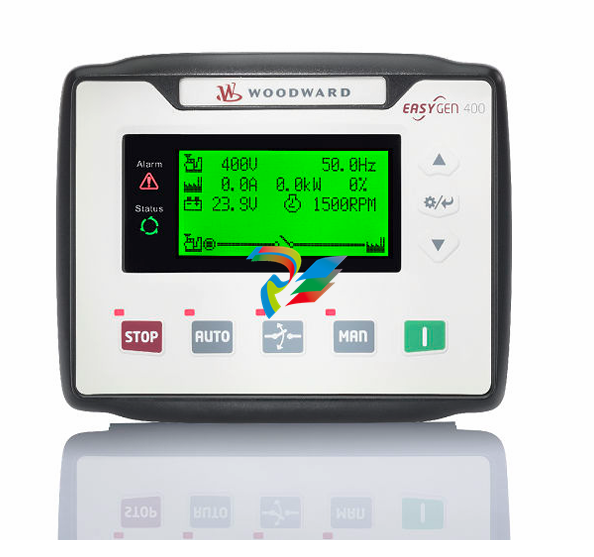
Woodward easYgen-400 Operation Manual Genset Control
easYgen-400
Operation Manual
Genset Control
Rev. Date Editor Changes
F 2023-08 MK NEW Software Version 2.1.0.8
•Suitable for new LCD display •
E 2021-06 MK NEW Software Version 2.1.0.7
•needed ToolKit-SC Version 1.5.1.5 or higher •
NEW features & functions
•Added output ports: 27 Preheat until safety, 28 Preheat until •
warming, 29 Preheat until cranking
Corrections/Repairs
•None •
D 2020-11 TM NEW Software Version 2.1.0.6
•needed ToolKit-SC Version 1.5.1.3 or higher •
NEW features & functions
•Support for HATZ ECU •
Corrections/Repairs
•None •
C 2020-11 TM NEW Software Version 2.1.0.5
NEW features & functions
• ID 835 Enumeration "emergency shutdown" function for discrete •
inputs
• ID 846 Action (alarm class) from analog inputs monitoring is now •
configurable
• ID 1099 Additional logic for maintenance counters •
• ID 1098 Semi-Auto mode for AMF start •
• ID 1103 Unbalanced load alarm •
Corrections/Repairs
• ID 837 Breaker logic "constant" de-energizes with breaker alarm •
• ID 931 Corrected Volvo ECU 50/60 Hz selection
Rev. Date Editor Changes
• ID 1000 Reference values for rated "active power" and "reactive •
power"
B 2019-05 PW NEW Software Revision 2.0.0.1 and ToolKit-SC version 1.5.0.4
Corrections/Repairs
•Fixed the following in HMI software: •
◦fixed the version name to 4 digits; ◦
◦possibility to close GCB when engine not running; ◦
◦kvar spelling; ◦
◦ impossibility to mute the horn with easYlite-200; ◦
◦HMI user defined sensor curves displaying messy codes in ◦
other languages
◦after gen closed, if changed breaker close delay by Toolkit-◦
sc, 6550 countdown error occurred in HMI;
◦when change to OEM plant theme and Terminal users ◦
theme, press close/open button in manual mode, error
occurred in breaker page;
◦Horn/Alarm Acknowledge / Alarm reset function ◦
◦"Traditional Chinese" implemented ◦
◦changed name easYgen400/easYgen1400 to easYgen-400/ ◦
easYgen-1400 in controller information page;
◦status LED not turning on if the "Conventional Engine" was ◦
selected, easYgen and genset in STOP condition, START
button pressed;
◦maintenance counter resetting ◦
◦Polish translation errors ◦
◦modified configuration of auto test mode, including number ◦
of input ports, LED display order, and level sensor changed
from flexible sensor to resistor type sensor;
◦ J1939 standard and setpoint idle ◦
◦Volvo EMS2 50/60Hz rated speed selection ◦
◦overload monitoring not using the "return" value; ◦
◦Volvo EMS2 rated frequency selection and rated speed ◦
modification;
◦mains breaker warning in MAN mode; ◦
◦operation mode changing from MAN with closed GCB to ◦
MCB;
◦breaker status in MAN mode; ◦
◦removed all ECU types with Modbus; ◦
◦removed “Baud rate and Modbus slave ID” parameters; ◦
◦parameter naming change: in order to align with ToolKit, ◦
changed “Current” to “Limit” and “Low fuel level” to “Fuel
level warning” in HMI parameter config screen;
•Fixed the following in ToolKit-SC
Rev. Date Editor Changes
◦fixed the version name of 2 digits displayed on ToolKit to 4 ◦
digits;
◦removed WWDMODEM-3G related parameters; ◦
◦removed “emergency stop input”; ◦
◦removed “Baud rate and Modbus slave ID”parameters; ◦
◦removed all ECU types with Modbus. ◦
A 2018-11 PC Describes device implemented software version 1.8 and
ToolKit-SC version 1.4.0.2
Additional markings
To highlight instructions, results, lists, references, and other elements, the following
markings are used in these instructions:
Marking Explanation
__▶ Step-by-step instructions
⇨ Results of action steps
╚═▷ References to sections of these instructions and to other
relevant documents
• Listing without fixed sequence
»Buttons« Operating elements (e.g. buttons, switches), display
elements (e.g. signal lamps)
»Display« Screen elements (e.g. buttons, programming of function
keys)
[Screen xx / Screen xy /
Screen xz] ...
Menu path.
The following information and setting refer to a page on
the HMI screen or ToolKit located as described here.
Some parameters/settings/screens are available only
either in ToolKit or on the HMI/display
1.2 Copyright And Disclaimer
Disclaimer
All information and instructions in this manual have been provided under due
consideration of applicable guidelines and regulations, the current and known state of the
art, as well as our many years of in-house experience. Woodward assumes no liability for
any damages due to:
•Failure to comply with the instructions in this manual •
• Improper use / misuse •
•Willful operation by non-authorized persons •
•Unauthorized conversions or non-approved technical modifications •
•Use of non-approved spare parts •
The originator is solely liable for the full extent for damages caused by such conduct. The
obligations agreed-upon in the delivery contract, the general terms and conditions, the
manufacturer’s delivery conditions, and the statutory regulations valid at the time the
contract was concluded, apply.
Copyright
This manual is protected by copyright. No part of this manual may be reproduced in any
form or incorporated into any information retrieval system without written permission of
Woodward GmbH.
Delivery of this manual to third parties, duplication in any form - including excerpts - as
well as exploitation and/or communication of the content, are not permitted without a
written declaration of release by Woodward GmbH.
Actions to the contrary will entitle us to claim compensation for damages. We expressly
reserve the right to raise any further accessory claims
1.3
Service And Warranty
Opening the device will nullify any warranty
Any such unauthorized modifications
•
• constitute "misuse" and/or "negligence" as per the product warranty
•
• thereby exclude warranty coverage for any resulting damage, and
•
• invalidate product certifications or listings.
Our Customer Service is available for technical information. Please see page 2 for contact
details.
In addition, our employees are interested in any new information and experiences that
arise from usage and could be valuable for improving our products.
1.4
1.4.1
Safety
Intended Use
The easYgen unit has been designed and constructed solely for the intended use
described in this Operation Manual and – with even more details – in the Technical
Manual.
•
• Intended use requires operation of the control unit within the range outlined in the
written specifications.
Steps to be taken for commissioning are outlined in the Technical Manual. •
• Intended use includes compliance with all instructions and safety notes presented in •
this manual.
•Any use which exceeds or differs from the intended use shall be considered improper •
use.
•No claims for any kind for damage will be considered if such claims result from •
improper use.
1.4.2 Personnel
This manual specifies the personnel qualifications required for the different areas of work,
listed below:
•Well trained for electrical installations. •
•Aware of the local safety regulations. •
•Experienced in working with electronic measuring and control devices. •
•Allowed to manage the controlled (engine/generator) system. •
The workforce must only consist of persons who can be expected to carry out their work
reliably. Persons with impaired reactions due to, for example, the consumption of drugs,
alcohol, or medication are prohibited.
When selecting personnel, the age-related and occupation-related regulations governing
the operating location must be observed
System Overview
General notes
The easYgen is a stand-alone genset controller with measuring, monitoring, and breaker
control functionality. It comes with an easily mountable plastic housing covering a
thoroughly tested electronic-electrical system.
Display and buttons of the HMI offer access to states and values, as well as access to the
application. Password protection enables the assignment of multiple operation access
levels. Remote access, monitoring, visualization, and configuration are possible via
integrated interfaces. Communication between easYgens using PLC control or as a
network member offers an enhanced system management range; additionally supported
by easy to implement accessories
2.1
2.2
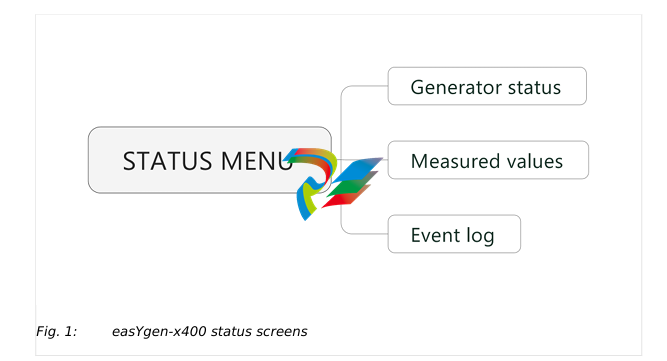
HMI Status Screens
HMI displays the following status screens:
•
• Status (home)
•
• Generator
•
• Load
•
• Engine 1
•
• Engine 2
•
• Status
•
• Alarm
•
• home screen etc.
ToolKit-SC Status Screens
General notes
ToolKit-SC lets you access status information via the following screens
Items Parameters Description
Engine info Engine speed, Battery volt, Charger volt D+
Sensor info Engine temp, Oil pressure, Fuel level Selection of ECU
data via J1939.
More info Coolant pressure, Coolant level,Fuel pressure, Fuel
temp, Turbo pressure, Oil temp, Inlet temp, Fuel
consume, Exhaust temp, Total consume
Alarms Current Alarms and Warning Lists of current
alarms and
warnings
(Digital )Inputs 01 High temperature shutdown, 02 Low oil pressure
shutdown, 10 Start request in AUTO, 11 Fuel level
warning, 12 Coolant level warning
(Digital) Outputs 02 Stop solenoid, 03 Idle control, 05 Close GCB, 06
Fuel relay, Start relay
Accumulation (run) Time, Starts
Next maintenance
time
Time
Engine hours Time
Generator status Gen status
Module info will be moved to Event log page
Items Parameters Description
Electricity quantity
Mains-/
Generator L1. L2. L3. L1-2. L2-3. L3-1. L1Phase, L2Phase, L3Phase, Frequency
Current (A) L1. L2. L3
Active power (kW) L1. L2. L3. Total
Reactive power (kvar) L1. L2. L3. Total
Apparent power (kVA) L1. L2. L3. Total
Power factor L1. L2. L3. Avg
Ext. Analog Inputs
[PARAMETER / STATUS MENU / Ext. analog inputs]
Items Parameters Description
Expansion AIN24 {X} {X}: 1 or 2
Cylinder Temp {Y} (in °C and °F) {Y}: 1 or 22
Exhaust Temp {Z} (in °C and °F) {Z}: 1 or 2
Sensor {N} {N}: 15 or 24
Event Log and Version
[PARAMETER / STATUS MENU / Event log and version]
Items Parameters Description
Module Info Model, Hardware Version, Software Version, Issue Date
Event log Fixed view of:
No., Event type
Columns "move behind" visible part of the screen:
Event Item, Date, Time,
((Mains control is not supported by this model, so all "Mains" values
are"0":))
Mains Uab (V) / Ubc (V) / Uca (V), Mains Ua (V), Mains Ub (V), Mains
Uc (V), Mains f (Hz),
Gens Uab (V) ..., Gens Ua (V) ..., Gens f(Hz),
Current Ia (A) ...,
Power (kW),
Speed (r/min),
Temp. (°C),
Press. (kPa),
Volt. (V)
Event log report
table. Showss the
99 latest events
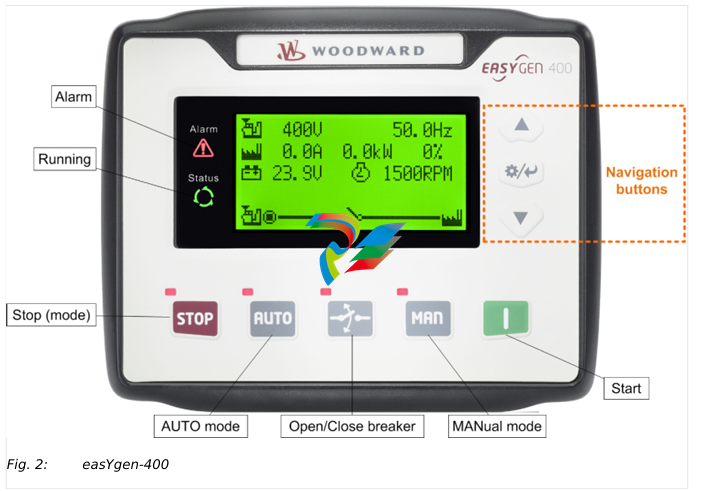
Icons Keys Description
STOP Auto/Manual mode: Stops running generator
Stop mode: Resets alarm
Lamp test (press at least 3 seconds)
Notes
During stopping process, press this button again to stop generator
immediately.
I (START) MANual mode: Start genset
MAN (Manual Mode) Press this key and the controller enters into MAN mode
AUTO (Automatic Mode) Press this key and the controller enters into AUTO mode
Open/Close breaker Release breaker control in MAN mode.
The navigation button "Up/Increase" is used to close the GCB
3.2.1
3.3
Alarm Acknowledgment
General notes
The alarm acknowledge handling is valid for following alarm classes
•
• Shutdown
•
• Trip/Stop
•
• Trip
Mute Horn
Any new active alarm activates the horn and is made visible by the flashing Alarm LED.
After pressing the "Down/Decrease" button, the horn is deactivated and the Alarm LED
changes from flashing to constantly active and stays active as long as any alarm is
present. An additional active alarm reactivates the horn and the Alarm LED starts flashing
again.
Stop by alarm
The operation mode automatically changes to STOP if a stopping alarm is active
(»Shutdown« or »Trip/Stop«).
Acknowledge alarm
In case of alarm condition, pressing the STOP button will reset the alarm.
Operation Modes
General notes
The easYgen offers three operation modes:
•
• AUTO
•
• MANUAL (MAN)
•
• STOP
•
• ... and an internal (non) operating phase during the start of the device itself
The operation mode can be initiated – provided the current settings allow for this
function:
•
• directly by pressing the respective button on the front panel
•
• directly by click on the respective button on the ToolKit-SC remote screen
•
• via discrete inputs
•
• via interface
3.3.1
General notes
In operation mode AUTO, both genset and breaker are under easYgen control. The start
and stopping of the engine is managed automatically, along with opening/closing the
breaker.
•
• supply load by generator
•
• start the engine
•
• stop the engine
3.3.2
Operation Mode MANual
General notes
In operation mode MANual, both genset and breakers are independent of each other
under easYgen control.
The starting and stopping of the engine are managed using the same procedure as in
AUTO mode but without breaker control. Breakers can be opened and closed without
taking care of load or genset state!
3.3.3
Operation Mode STOP
General notes
In operation mode STOP, the breaker is open and the engine is not running.
3.4
3.4.1
START/STOP Operation
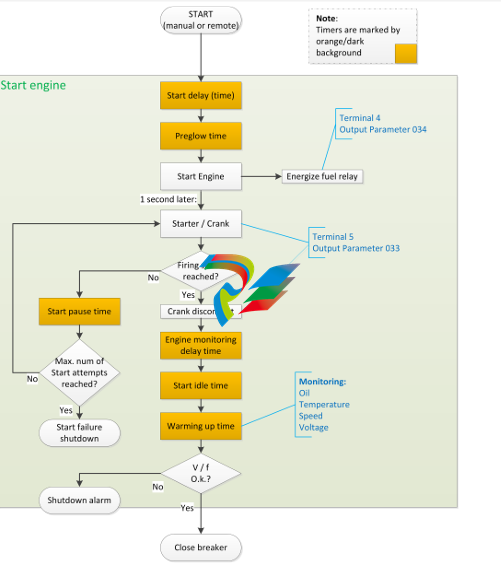
Start engine to supply load
The AUTO Start procedure is going through sub procedures with own timers
3.5
Pressing
can stop the running generator as described above.
Transition Procedures
3.5.1
Disconnect during cranking
There are three conditions under control to abort the starting of the engine:
•
• speed sensor
•
• generator frequency
•
• engine oil pressure
They can be used separately or in combinations.
We recommend selecting all three at the same time: engine oil pressure together with
speed sensor, and generator frequency. This allows for an immediate separation of the
starter motor from the engine. Additionally, crank disconnect can be checked exactly.
When set to speed sensor, ensure that the number of flywheel teeth is the same as
setting.
5 Glossary and List of Abbreviations
CB Circuit Breaker
CT Current Transformer
DI Discrete Input
DO Discrete (Relay) Output
ECU Engine Control Unit
FMI Failure Mode Indicator
GCB Generator Circuit Breaker
GOV (speed) Governor; rpm regulator
HMI Human Machine Interface e.g., a front panel with display and
buttons for interaction
I Current
MCB Mains Circuit Breaker
MPU Magnetic Pickup Unit
N.C. Normally Closed (break) contact
N.O. Normally Open (make) contact
NC Neutral Contactor
OC Occurrence Count
Operation In (general) operation.
State when the genset is running according to the selected
mode, all parameters are in allowed values and ranges, and
without OPEN requests or alarms. Somehow "waiting for next
occurrence".
P Real power
P/N Part Number
PF Power Factor
PT Potential (Voltage) Transformer
Q Reactive power
S Apparent power
S/N Serial Number
SPN Suspect Parameter Number
V Voltage
Index
A
Alarms
Classes . . . . . . . . . . . . . . . . . . . . . . . . . . . . . . . . . . . . . . . . . . . . . . . . . . . . . . . . . . . . . . . . . . . . . . . . . . . . . . . . . . . . . . . . . . . . 25█
Shutdown Alarms . . . . . . . . . . . . . . . . . . . . . . . . . . . . . . . . . . . . . . . . . . . . . . . . . . . . . . . . . . . . . . . . . . . . . . . . . . . . . . . . . . . . . . . . . . . . 26█
C
Contact person . . . . . . . . . . . . . . . . . . . . . . . . . . . . . . . . . . . . . . . . . . . . . . . . . . . . . . . . . . . . . . . . . . . . . . . . . . . . . . . . . . . . . . . . . . . . 9█
Customer Service . . . . . . . . . . . . . . . . . . . . . . . . . . . . . . . . . . . . . . . . . . . . . . . . . . . . . . . . . . . . . . . . . . . . . . . . . . . . . . . . . . . . . . . . . . . . 9█
F
Functions . . . . . . . . . . . . . . . . . . . . . . . . . . . . . . . . . . . . . . . . . . . . . . . . . . . . . . . . . . . . . . . . . . . . . . . . . . . . . . . . . . . . . . . . . . . . 12█
I
Intended use . . . . . . . . . . . . . . . . . . . . . . . . . . . . . . . . . . . . . . . . . . . . . . . . . . . . . . . . . . . . . . . . . . . . . . . . . . . . . . . . . . . . . . . . . . . . 9█
K
Keys . . . . . . . . . . . . . . . . . . . . . . . . . . . . . . . . . . . . . . . . . . . . . . . . . . . . . . . . . . . . . . . . . . . . . . . . . . . . . . . . . . . . . . . . . . . . 16█
O
Operation . . . . . . . . . . . . . . . . . . . . . . . . . . . . . . . . . . . . . . . . . . . . . . . . . . . . . . . . . . . . . . . . . . . . . . . . . . . . . . . . . . . . . . . . . . . . 16█
Operation Modes . . . . . . . . . . . . . . . . . . . . . . . . . . . . . . . . . . . . . . . . . . . . . . . . . . . . . . . . . . . . . . . . . . . . . . . . . . . . . . . . . . . . . . . . . . . . 18█
P
Personnel . . . . . . . . . . . . . . . . . . . . . . . . . . . . . . . . . . . . . . . . . . . . . . . . . . . . . . . . . . . . . . . . . . . . . . . . . . . . . . . . . . . . . . . . . . . . 10█
S
Service . . . . . . . . . . . . . . . . . . . . . . . . . . . . . . . . . . . . . . . . . . . . . . . . . . . . . . . . . . . . . . . . . . . . . . . . . . . . . . . . . . . . . . . . . . . . 9█
Symbols
in the instructions . . . . . . . . . . . . . . . . . . . . . . . . . . . . . . . . . . . . . . . . . . . . . . . . . . . . . . . . . . . . . . . . . . . . . . . . . . . . . . . . . . . . . . . . . . . . 7█
System Overview . . . . . . . . . . . . . . . . . . . . . . . . . . . . . . . . . . . . . . . . . . . . . . . . . . . . . . . . . . . . . . . . . . . . . . . . . . . . . . . . . . . . . . . . . . . . 12█
29 easYgen-400 B37890A
Index
Released
T
Trouble Shooting . . . . . . . . . . . . . . . . . . . . . . . . . . . . . . . . . . . . . . . . . . . . . . . . . . . . . . . . . . . . . . . . . . . . . . . . . . . . . . . . . . . . . . . . . . . . 24█
U
Use . . . . . . . . . . . . . . . . . . . . . . . . . . . . . . . . . . . . . . . . . . . . . . . . . . . . . . . . . . . . . . . . . . . . . . . . . . . . . . . . . . . . . . . . . . . . 9█
W
Warnings . . . . . . . . . . . . . . . . . . . . . . . . . . . . . . . . . . . . . . . . . . . . . . . . . . . . . . . . . . . . . . . . . . . . . . . . . . . . . . . . . . . . . . . . . . . . 25█
Warranty . . . . . . . . . . . . . . . . . . . . . . . . . . . . . . . . . . . . . . . . . . . . . . . . . . . . . . . . . . . . . . . . . . . . .
-
Beckhoff CX5120-0160 CPU module,
-
Beckhoff CX5120-0150 CPU module
-
Beckhoff CX5120-0143 CPU module
-
Beckhoff CX5120-0142 CPU module
-
Beckhoff CX5120-0141 CPU module, Microsoft Windows 10 IoT Enterprise 2016 LTSB
-
Beckhoff CX5120-0140 CPU module
-
Beckhoff CX5120-0130 CPU module
-
Beckhoff CX5120-0123 CPU module
-
Beckhoff CX5120-0122 CPU module
-
Beckhoff CX5120-0120 CPU module
-
Beckhoff CX5120-0113 CPU module
-
Beckhoff CX5120-0112 CPU module
-
Beckhoff CX5120-0111 CPU module
-
Beckhoff CX5120-0110 CPU module
-
Beckhoff CX5120-0100 CPU module, no operating system
-
Beckhoff C6017-0040 | Fanless ultra-compact Industrial PC
-
Beckhoff C6017 | Fanless ultra-compact Industrial PC
-
Beckhoff C6015-0030 | Fanless ultra-compact Industrial PC
-
Beckhoff C6015-0040 | Fanless ultra-compact Industrial PC
-
Beckhoff C6015 | Fanless ultra-compact Industrial PC
-
Beckhoff CX2500-M510 | Fieldbus master module
-
Beckhoff CX2500-M310 | Fieldbus master module
-
Beckhoff CX2500-B510 | Fieldbus slave module
-
Beckhoff CX2500-B310 | Fieldbus slave module PROFIBUS for CX20xx, CX52x0. CX53x0. CX56x0
-
Beckhoff CX2500-0070 | USB 3.0 module for CX20xx, CX52xx, CX53x0. CX56x0
-
Beckhoff CX2500-0062 | 2.5 Gbit Ethernet module for CX20xx, CX52x0. CX53x0. CX56x0
-
Beckhoff CX2500-1061 | Power over Ethernet module for CX20xx, CX52x0. CX53x0. CX56x0
-
Beckhoff CX2500-1060 | Ethernet module for CX20xx, CX52x0. CX53x0. CX56x0
-
Beckhoff CX2500-0031 | Serial Interface RS485/RS422
-
Beckhoff CX2500-0030 | Serial Interface RS232 for CX20xx, CX52x0. CX53x0. CX56x0
-
Beckhoff CX5230-0195 CPU module
-
Beckhoff CX5230-0190 CPU module
-
Beckhoff CX5230-0175 CPU module,
-
Beckhoff CX5230-0170 CPU module
-
Beckhoff CX5230-0100 CPU module, no operating system, no TwinCAT
-
Beckhoff CU8130-0240 | UPS modul, battery-backed
-
Beckhoff CU8130-0120 | UPS module, battery-backed
-
Beckhoff CU8110-0120 | UPS module, capacitive
-
Beckhoff CU8110-0060 | UPS module, capacitive
-
Beckhoff CX5130-0195 CPU module
-
Beckhoff CX5130-0190 CPU module
-
Beckhoff CX5130-0185 CPU module
-
Beckhoff CX5130-0170 CPU module
-
Beckhoff CX5130-0163 CPU module, Microsoft Windows 10 IoT Enterprise 2019 LTSC, 32 bit
-
Beckhoff CX5130-0162 CPU module
-
Beckhoff CX5130-0161 CPU module
-
Beckhoff CX5130-0160 CPU module
-
Beckhoff CX5130-0155 CPU module
-
Beckhoff CX5130-0150 CPU module
-
Beckhoff CX5130-0143 CPU module
-
Beckhoff CX5130-0142 CPU module
-
Beckhoff CX5130-0140 CPU module
-
Beckhoff CX5130-0135 CPU module
-
Beckhoff CX5130-0130 CPU module
-
Beckhoff CX5130-0125 CPU module
-
Beckhoff CX5130-0123 CPU module
-
Beckhoff CX5130-0122 CPU module
-
Beckhoff CX5130-0121 CPU module
-
Beckhoff CX5130-0115 CPU module,
-
Beckhoff CX5130-0113 CPU module
-
Beckhoff CX5130-0112 CPU module
-
Beckhoff CX5130-0111 CPU module
-
Beckhoff CX5130-0110 CPU module, Microsoft Windows Embedded Compact 7. no TwinCAT
-
Beckhoff CX5130-0100 CPU module, no operating system, no TwinCAT
-
DEIF FAS-113DG Synchronisation & circuit breaker closing
-
DEIF FAS-115DG Synchronisation & circuit breaker closing
-
DEIF HAS-111DG Synchronisation & circuit breaker closing
-
DEIF LSU-122DG Load sharing, paralleling & operation
-
DEIF LSU-114DG Load sharing, paralleling & operation
-
DEIF LSU-113DG Load sharing, paralleling & operation
-
DEIF LSU-112DG Load sharing, paralleling & operation
-
DEIF RMF-112D Frequency relay
-
DEIF RMC-142D Current relay
-
DEIF RMC-132D Current relay
-
DEIF RMC-131D Current relay
-
DEIF RMC-122D Current relay
-
DEIF RMC-121D Current relay
-
DEIF RMC-111D Current relay
-
DEIF MVR-V211 Busbar Protection
-
DEIF MVR-T257 Transformer Differential Protection
-
DEIF MVR-T256 Transformer Differential Protection
-
DEIF MVR-T216 Transformer Differential Protection
-
DEIF MVR-T215 Transformer Protection
-
DEIF MVR-M257 Motor Differential Protection
-
DEIF MVR-M255 Motor Protection
-
DEIF MVR-M215 Motor Protection
-
DEIF MVR-M210 Motor Protection
-
DEIF MVR-G257 Generator Differential Protection
-
DEIF MVR-G215 Generator Protection
-
DEIF MVR-F255 Directional Feeder Protection
-
DEIF MVR-F215 Directional Feeder Protection
-
DEIF MVR-F210 Feeder Protection
-
DEIF MVR-F205 Directional Feeder Protection
-
DEIF MVR-F201 Basic Feeder Protection
-
DEIF MVR-200 series Medium Voltage Relay
-
DEIF MDR-2 Multi-differential relay
-
DEIF LMR-122D Loss of mains relay
-
DEIF LMR-111D Loss of mains relay
-
DEIF APU-4 Advanced G59 and G99 protection unit
-
DEIF iE 650 PLC - The most robust programmable automation controller available
-
DEIF iE 350 PLC - Programmable Automation PLC Controller
-
DEIF iE 250 PLC Versatile and modular intelligent energy PLC controller
-
DEIF PPM-3 EDG Protection and Power Management
-
DEIF AGC 3X 4198000234E AUTOMATIC GENSET CONTROLLER
-
SAUTER ASF123 Damper actuator with spring return
-
SAUTER ASF122 Damper actuator with spring return
-
SAUTER ASF113F122 Damper actuator with spring return
-
SAUTER ASF113F120 Damper actuator with spring return
-
SAUTER ASF112F122 Damper actuator with spring return
-
SAUTER ASF112F120 Damper actuator with spring return
-
SAUTER ASM 124/134 series - ASM134F130 Damper actuator
-
SAUTER ASM 124/134 series - ASM134SF132 Damper actuator
-
SAUTER ASM 124/134 series - ASM124SF132 Damper actuator
-
SAUTER ASM 124/134 series - ASM124F122 Damper actuator
-
SAUTER ASM 124/134 series - ASM124F120 Damper actuator
-
SAUTER Valve actuator ASM 105S/115S series ASM115SF152
-
SAUTER Valve actuator ASM 105S/115S series ASM105SF152
-
SAUTER Valve actuator ASM 105S/115S series ASM115SF132
-
SAUTER Valve actuator ASM 105/115 series ASM105SF132
-
SAUTER Valve actuator ASM 105/115 series ASM115F122
-
SAUTER Valve actuator ASM 105/115 series ASM115F120
-
SAUTER Valve actuator ASM 105/115 series ASM105F122
-
SAUTER Valve actuator ASM 105/115 series ASM105F120
-
SAUTER Valve actuator ASM 105/115 series ASM105F10
-
SAUTER AKF113S Rotating actuator AKF 112/113 series
-
SAUTER AKF113F122 Rotating actuator AKF 112/113 series
-
SAUTER AKF113F120 Rotating actuator AKF 112/113 series
-
SAUTER AKF112F122 Rotating actuator AKF 112/113 series

Add: High-tech Software Park, Xiamen City, Fujian Province
Mobile: +86-17750019513(WhatsApp)
Email: yy4291644@gmail.com
Website: https://www.abb-sis.com
.jpg)
.jpg)
.jpg)
.jpg)
.jpg)
.jpg)

-
Beckhoff CX5120-0160 CPU module,
-
Beckhoff CX5120-0150 CPU module
-
Beckhoff CX5120-0143 CPU module
-
Beckhoff CX5120-0142 CPU module
-
Beckhoff CX5120-0141 CPU module, Microsoft Windows 10 IoT Enterprise 2016 LTSB
